Understand the DOM and events: robust JavaScript interactions
From suitable controls to delegated listeners: a complete example with keyboard checks, dynamic cards and explicit responsibility boundaries.

A button initially works. After a small design change, only its outer edge responds. Newly added cards do nothing, or one click changes the same selection twice. These failures often arise because the program expects a different document structure from the one actually present.
This guide explains DOM access and event handling through a fictional event shortlist. The complete example uses ordinary HTML buttons and one listener on their shared region. It changes the current page's state rather than booking an event permanently. Primary sources were checked on 9 November 2026.
1. Treat the document structure as the foundation
HTML describes content and relationships. The browser exposes a structure that programs can inspect. A heading, section and button are different nodes with particular properties.
The DOM Standard defines node trees and events among other mechanisms. In practical work, examine the current structure. Scripts may have changed it after initial loading.
The example contains several event cards inside one region. Each card has a title and button. A span inside the button carries its visible label. That extra level of nesting matters when handling the event.
When investigating a failure, inspect the actual rendered structure in developer tools first. An old template or screenshot does not reliably show the elements currently present. Nor does visual proximity prove that an element belongs to the expected card.
Check ownership explicitly. A floating control may look attached to a card while being placed elsewhere in the DOM. If code relies on ancestry, its assumptions must match that structure rather than merely its visual arrangement.
2. Define behaviour before implementation
The shortlist needs a clear rule. Activating a control selects exactly its event. Activating it again removes that selection. Other cards remain unchanged. A status line describes the latest change.
This rule is deliberately small. It includes neither persistence across navigation nor registration with an organiser. A lasting shortlist needs additional decisions about storage, accounts and error states.
Describe non-actions too. Clicking the heading must not accidentally select the event. A details link should keep its own purpose. Making the entire card an invisible button would blur these distinctions.
These requirements become the checks performed later. They describe observable behaviour. Counting JavaScript lines cannot establish whether the correct card changes.
Preserve the difference between a product requirement and an implementation preference. “New cards should remain operable” is a requirement. “Use one listener” is a possible design choice that must be justified by the actual component.
3. Begin with appropriate HTML
The example's in-page action belongs in a button. A link would suit navigation to another document. Establish that meaning before registering a listener.
The HTML Standard's button section describes its behaviour and types. Here, type="button" explicitly avoids requesting form submission. This prevents a surprising default action if the region later appears inside a form.
The control uses aria-pressed to expose its toggle state. Its label remains “Save”. State information complements the name rather than replacing it with an entirely different term on every activation.
A merely clickable div would create extra keyboard, focus and semantic responsibilities. Using a suitable existing control keeps the teaching example clearer.
The choice also helps maintenance. A later contributor can recognise a button's role directly from the markup. Behaviour hidden behind a presentation-only container requires more explanation and is easier to disturb.
4. Establish the shortlist structure
<section id="termin-liste" aria-labelledby="termine-titel">
  <h2 id="termine-titel">Events</h2>
  <article data-id="html-workshop">
    <h3>HTML workshop</h3>
    <button type="button" data-action="merken" aria-pressed="false">
      <span>Save</span>
    </button>
  </article>
</section>
<p id="merkliste-status" role="status">No selection changed.</p>
The data-id identifies the card within this example. It is neither authorisation nor evidence of a valid reservation. A real application must not treat such values as sufficient permission for server operations.
The data-action attribute identifies the intended action. A class used for colour or spacing would be a weaker sole dependency, because a design revision could unexpectedly change behaviour.
The status paragraph sits outside the monitored event region. Updating it therefore does not change a card's content. A complete product review still needs to assess how the feedback is perceived through relevant assistive technology.
The German identifiers are deliberately retained between language variants so the same behaviour can be tested consistently. Visible content changes language; technical names do not need to match the interface's prose.
5. Distinguish the listener from the original target
A listener is a registered response to a particular event type. The MDN addEventListener() reference documents registration and options. This example attaches a click listener to the event region.
That does not mean it only processes a click directly on empty space in that region. A suitable event path can carry occurrences from descendants to the region. Delegation uses that relationship.
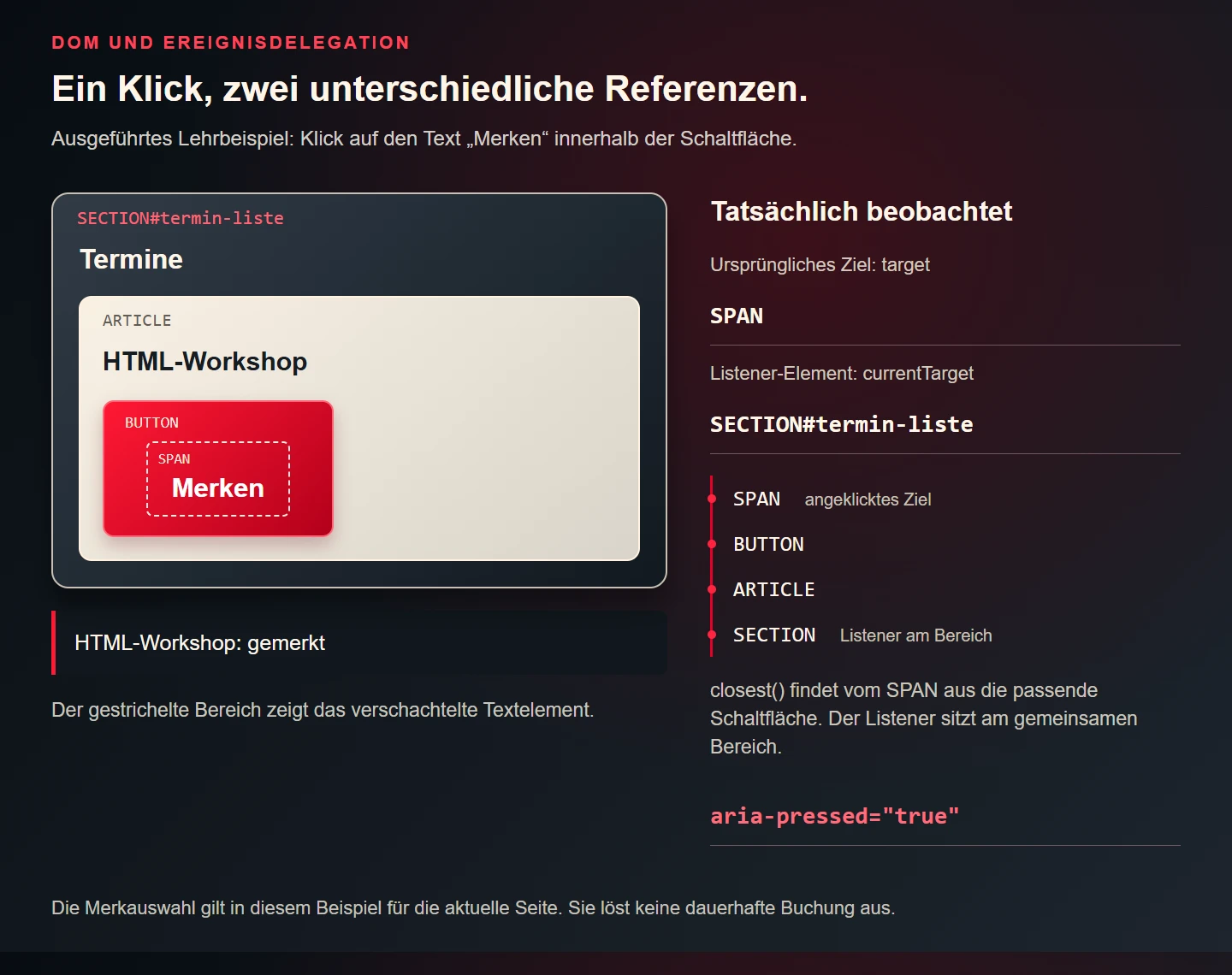
Within the handler, target identifies the original target. currentTarget identifies the region whose listener is currently running. They can differ. Clicking the nested span makes that distinction particularly visible.
Name these roles while debugging. “The button receives the click” is imprecise when the registered listener belongs to the section and the original target was a nested text container.
A diagnostic record should therefore include both values. If the listener runs but its selector rejects the span, the problem differs from a listener that was never registered on the current section.
6. Follow the event path
For the ordinary click in a normal DOM tree examined here, the path can be explained through capture, target and bubbling phases. The MDN introduction to event bubbling demonstrates these relationships and delegation.
The example uses ordinary bubbling handling. A click on a descendant text container can reach the shared event region. Each existing text container does not need its own separate listener.
This does not mean every event type behaves identically. Other events and components using Shadow DOM require appropriate analysis. An introductory diagram should explain its chosen case rather than claim to describe every browser situation.
When logging, inspect the event type, original target and current listener region. This separates an unreachable handler from one that returns early because its condition is too narrow.
7. Associate nested content with closest()
Comparing target directly with the button would be too restrictive. When the label's span is clicked, that element is the original target. The action should nevertheless belong to the surrounding button.
The closest() method checks the element itself and its ancestors for a matching selector. This associates the text container with the nearest button carrying the intended action.
Then restrict that button to the responsible region. The example checks whether it actually belongs inside the monitored list. Its associated card must belong there too.
These conditions document structural expectations. They do not convert arbitrary DOM values into a trusted business decision. Their purpose is correct association within this bounded example.
Use selectors that communicate that intention. A very broad lookup for any button would also catch unrelated controls added later. An action-specific selector makes the component's responsibility easier to understand.
8. Implement the delegated response
Run the following code after its HTML exists, for example through a module integrated appropriately into the loading process. It checks the required elements and registers one response for the demonstrated region.
const list = document.querySelector("#termin-liste");
const status = document.querySelector("#merkliste-status");

if (list && status) {
  list.addEventListener("click", function (event) {
    if (!(event.target instanceof Element)) return;
    const button = event.target.closest('button[data-action="merken"]');
    if (!button || !list.contains(button)) return;
    const card = button.closest("article[data-id]");
    if (!card || !list.contains(card)) return;

    const selected = button.getAttribute("aria-pressed") !== "true";
    button.setAttribute("aria-pressed", String(selected));
    const name = card.querySelector("h3")?.textContent.trim() || card.dataset.id;
    status.textContent = name + (selected ? ": saved" : ": removed");
  });
}
The state changes on the relevant control. The status paragraph receives ordinary text through textContent. It does not execute HTML assembled from an input, making this particular output easier to inspect.
If either required element is absent, no listener is registered. A full application should additionally decide how development and operational diagnostics expose that structural failure. Quietly returning is not a universal error strategy.
The code deliberately performs one synchronous interface change. Adding network activity would introduce other states and failure modes. Those should be designed explicitly rather than concealed inside the existing success message.
9. Handle newly inserted cards
A matching click from a card inserted into the same existing region can reach the current listener. This is an important practical benefit of delegation in the example.
The new card must satisfy the expected structure. A matching button without an associated article is deliberately ignored. Nor is a newly created section automatically the same monitored region simply because it looks identical.
If the whole section is replaced, the listener remains attached to the removed old element. Initialisation must then match the component's real lifetime. Delegation does not solve every dynamic-interface lifecycle problem.
Test insertion and replacement separately. Success after adding a card does not demonstrate successful replacement of the containing section.
Keep that distinction in change reviews. A refactor that swaps the root node changes the assumptions even if the card markup itself is untouched. Existing tests should make that boundary visible.
10. Separate default action from propagation
| Mechanism | Question | Useful check |
|---|---|---|
| preventDefault() | Should a cancelable default action be prevented? | Does intended navigation still work? |
| stopPropagation() | Should the event stop reaching other nodes? | Do responsible ancestor listeners still run? |
| closest() | Which matching element owns the target? | Does clicking nested text work? |
| Region check | Does the element belong to this component? | Are unrelated actions left alone? |
The MDN references for preventDefault() and stopPropagation() describe different interventions. Canceling a default action does not automatically stop propagation. Stopping propagation does not automatically cancel the default action.
The demonstrated shortlist button needs neither operation. Its meaning is already appropriately bounded through type="button". Calling both methods defensively in every handler could disrupt other intended behaviour.
11. Test keyboard operation as the same task
A real button provides a sensible starting point for different input methods. Test Enter and Space activation in the relevant browser. The application should perform the same substantive state change.
Do not add a second keyboard handler that repeats the toggle without understanding normal activation. Two changes can leave the interface apparently unchanged.
Check focus after the update as well. The example does not replace the existing button, so updating feedback does not itself require moving focus to a newly created control.
A passing keyboard check does not establish complete accessibility. Names, contrast, focus appearance and understandable feedback also matter. Record the actual scope of the verification.
12. Understand registration and lifetime
If initialisation repeatedly creates new handler functions, several responses can become attached to the same region. One click may then be processed more than once. Inspect actual registrations during debugging.
Initialisation and removal belong to component architecture. A static page has different needs from an interface repeatedly constructing and removing the same region.
The example assumes one script execution after the relevant HTML. Verify that assumption before integrating it into a larger system. An isolated correct fragment can still be used incorrectly within a different lifecycle.
Assign clear ownership of behaviour. Two independent scripts managing the same selection can produce conflicting changes. Another class or listener rarely addresses the underlying responsibility problem.
13. Separate DOM state from business data
The demonstration keeps current selection in the button attribute. That is sufficient for its limited purpose. A persistent shortlist requires a deliberate data model and storage mechanism.
When adding a server request, do not prematurely describe a local selection as confirmed persistence. Design pending transmission, failure and retry behaviour. These are separate responsibilities from associating a click with its card.
Data attributes are not a security boundary. People can modify the DOM in their own browser. A server must independently validate relevant identifiers and permissions.
This distinction also helps interpret tests. A browser check can establish the visible selection. Without additional verification, it does not prove a reservation or durable record reached the intended system.
14. Use a focused test table
| Case | Expected result | Failure indicated |
|---|---|---|
| Click span inside button | Only that card changes | Target check too narrow |
| Activate again | Selection removed | Missing toggle behaviour |
| Click heading | No selection change | Action region too broad |
| Add card to existing region | Delegation applies | Wrong structure or registration |
| Enter and Space | One change per activation | Duplicate keyboard handling |
| Action outside list | List unchanged | Missing ownership boundary |
This is an original test plan for the teaching example. It is not a general browser matrix or verification of every component on a business website. Add cases when the structure or required behaviour changes.
Investigate the smallest difference first. Clicking the button's background may work while clicking its text fails. That comparison often identifies the cause more directly than rewriting the entire script.
15. Check design changes against the behaviour contract
An icon added inside the button is a small visual change with potential consequences. Its purpose remains the same, but the original event target may now be the icon. The handler should still associate the interaction with the intended button.
A rule such as “the target's parent is always the button” is fragile when another nesting layer appears. Looking for the intended matching ancestor expresses the purpose more accurately. Its result must still belong to the responsible component.
A new details link deserves its own check. It should navigate rather than modify selection. A broad handler treating every card click as Save would accidentally take over that new control.
Reordering cards should not change their identity either. The example uses the associated card identifier rather than a fixed list position. A third visible item does not necessarily remain the same event after sorting.
16. Capture focused diagnostic information
A useful failure report identifies the activated element, affected card, previous selection state and input method. “It does not work” plus a screenshot rarely supplies enough information.
Temporary logging can distinguish the original target, listener region and matched button. A handler that runs without finding the intended ancestor needs a different correction from one never initialised on the current section.
Avoid unnecessary personal information in diagnostic output. This example needs no visitor names or account details to establish which control changed. Use the smallest record that makes the behaviour reproducible, then remove or restrict verbose development logging for regular operation.
17. Interaction checklist
- Are the action and expected state change defined?
- Does the control use appropriate HTML semantics?
- Is the current DOM structure being examined?
- Are target and currentTarget distinguished?
- Are nested targets associated correctly?
- Is the handler restricted to its responsible region?
- Are default action and propagation handled deliberately?
- Does initialisation match component lifetime?
- Were keyboard operation and dynamic content tested?
- Are local presentation and confirmed persistence distinguishable?
18. Frequently asked questions
Does every button need a separate listener?
No. A shared region can handle suitable events. A separate listener may still suit a small independent component. Choose according to structure and lifetime.
Is delegation automatically faster?
A general speed claim needs concrete measurement. Here delegation simplifies support for additional cards. Its initial justification is a clear workflow rather than an unsupported performance promise.
Can CSS display the state?
Yes. A rule can use the existing aria-pressed attribute. Ensure presentation reflects the same state instead of introducing a second contradictory selection model.
Where should debugging begin?
Inspect the actual elements, registered region and original target, then the handler's conditions. Focused observation usually helps more than adding an unconditional propagation stop.