Modern JavaScript without unnecessary libraries
From a useful HTML starting point to a tested enhancement: use browser features deliberately and justify additional dependencies.

A small filter, an expandable explanation or a calculation does not automatically require a large framework. Browsers already provide many useful capabilities. However, “without a library” does not automatically mean fast, secure or maintainable. Handwritten code can also become difficult to understand and contain errors.
This guide develops a small filtering component for a fictional course catalogue. The data is illustrative. There are no claimed customer results or invented speed measurements. The focus is a sound starting page, a clear state change and meaningful verification. The approach is especially useful for bounded enhancements to a business website.
1. Define the actual feature
Clarify the task before selecting technology. Visitors should be able to switch between all courses, online courses and in-person courses. Course information already exists in HTML. After a selection, the matching entries should remain visible and an understandable result count should update.
Registration, payment and server-side search are outside this task. These boundaries matter. Thousands of entries, access restrictions or time-dependent availability could require a different architecture later. This small demonstration is not a complete booking system.
Write requirements as observable outcomes. “Choosing Online displays only online courses” can be checked. “Use modern JavaScript” mainly describes a technical preference. Edge cases are equally important: what happens without JavaScript, how does keyboard interaction work and is there a comprehensible empty result?
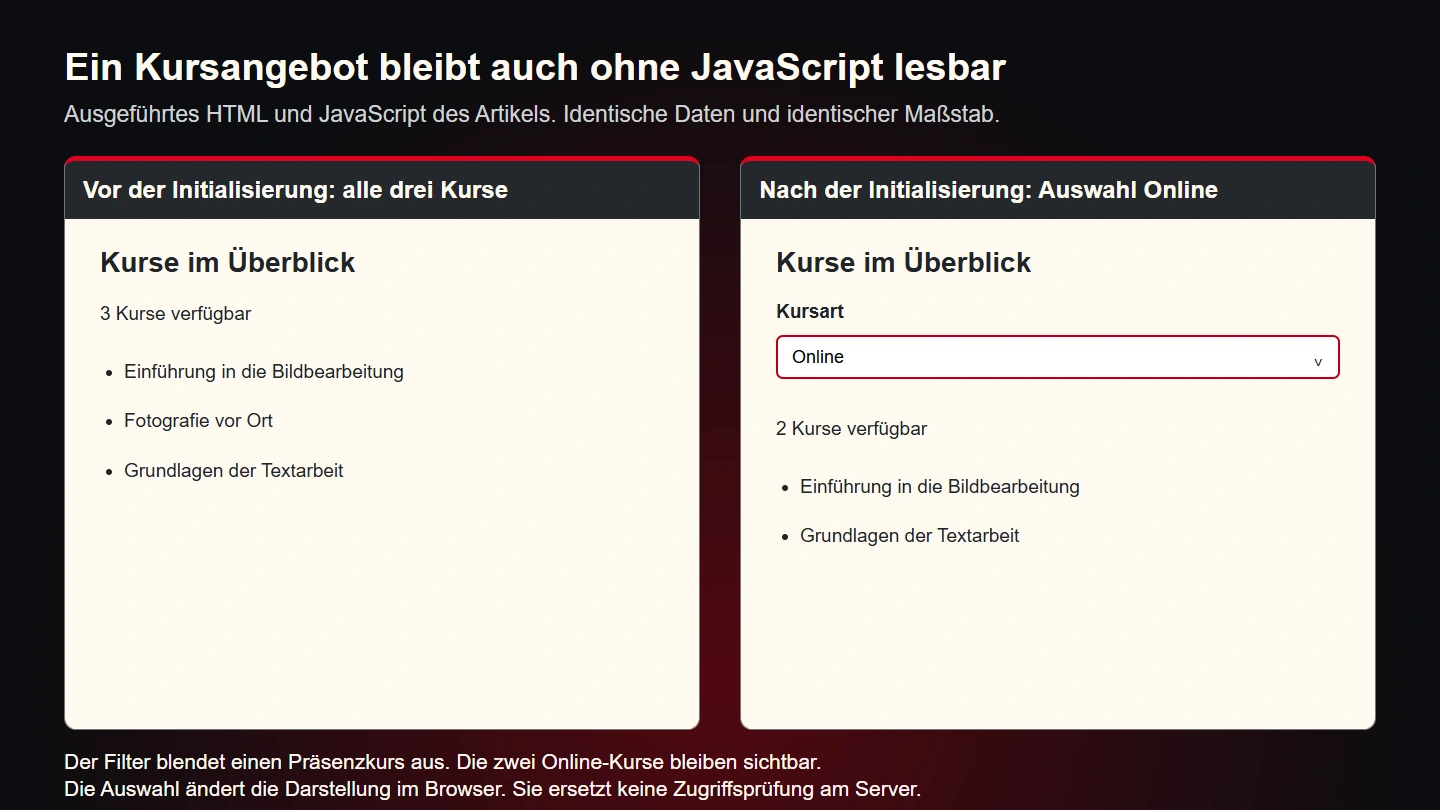
The fallback in this example is to keep every course visible without scripting. Controls become visible only after successful initialisation. The interface therefore does not advertise a feature that is missing after a loading failure. This choice suits a small public catalogue, but not automatically an application that must enforce permissions.
2. Match browser features to the task
The basic tools are straightforward: locate an element, respond to an event and update a predictable state. The MDN querySelector reference explains selecting the first matching element. That does not guarantee the element exists on every page. Initialisation still needs to account for its absence.
| Task | Suitable starting point | Important check |
|---|---|---|
| Locate a component | querySelector within a specific root | Handle missing elements |
| Read a choice | The select element's change event | Check keyboard and touch use |
| Hide entries | The hidden property | Relevant information remains available |
| Write a count | textContent | Do not interpret text as HTML |
| Separate code | An ES module or initialisation function | Avoid unnecessary global variables |
A native select already provides basic interaction. A visible label and clearly designed focus still matter. A custom dropdown would introduce additional states and testing work. Without a further requirement, that extra complexity would not help the task in this example.
Choosing a browser feature does not remove every responsibility. Hiding an entry changes its availability, for example. If focus is inside an area that becomes hidden, a deliberate response is needed. Here, selection stays outside the course entries, so filtering does not remove a currently focused course control.
3. Start with useful HTML
The following HTML contains the complete initial information. Three courses keep the demonstration small. A data attribute identifies the component. The controls begin hidden while the content remains visible. The initial count is part of the document and will later be updated.
<section data-course-filter aria-labelledby="courses">
  <h2 id="courses">Available courses</h2>
  <div data-filter-controls hidden>
    <label for="course-kind">Course type</label>
    <select id="course-kind" data-filter-select>
      <option value="all">All courses</option>
      <option value="online">Online</option>
      <option value="onsite">In person</option>
    </select>
  </div>
  <p data-filter-count role="status">3 courses available</p>
  <ul>
    <li data-course-kind="online">Introduction to image editing</li>
    <li data-course-kind="onsite">Photography on location</li>
    <li data-course-kind="online">Writing fundamentals</li>
  </ul>
</section>
The machine-readable values online and onsite are deliberately independent of visible labels. A translation can change wording without changing comparison logic. The initial count must match the entries actually delivered. A dynamic application should derive both from the same data source.
The select ID must remain unique within the document. Multiple instances need separate IDs and corresponding labels. Data attributes let the script locate its local elements, but do not replace correct form labelling.
4. Write a bounded initialisation function
The function receives a component root and searches only inside it. If an essential part is missing, it leaves the enhancement inactive and the courses visible. The count uses text output rather than interpreting a string as HTML.
export function initCourseFilter(root) {
  const controls = root.querySelector('[data-filter-controls]');
  const select = root.querySelector('[data-filter-select]');
  const count = root.querySelector('[data-filter-count]');
  const items = [...root.querySelectorAll('[data-course-kind]')];

  if (!controls || !select || !count || items.length === 0) return;
  if (root.dataset.filterReady === 'true') return;

  function update() {
    const wanted = select.value;
    let visible = 0;
    for (const item of items) {
      const matches = wanted === 'all' || item.dataset.courseKind === wanted;
      item.hidden = !matches;
      if (matches) visible += 1;
    }
    count.textContent = visible === 1
      ? '1 course available'
      : `${visible} courses available`;
  }

  select.addEventListener('change', update);
  update();
  root.dataset.filterReady = 'true';
  controls.hidden = false;
}

document.querySelectorAll('[data-course-filter]').forEach(initCourseFilter);
The marker prevents duplicate initialisation of the same existing element. It is sufficient for this static demonstration. A more complex lifecycle involving replaced DOM regions also needs a clear decision about teardown and reinitialisation. An existing data attribute is not a complete component lifecycle model.
Load the file as a module, for example with <script type="module" src="/assets/course-filter.js"></script>. The MDN JavaScript modules guide explains the foundations. Test the real page through an HTTP server so module loading is checked under the intended delivery conditions.
5. Separate data decisions from presentation
The loop is understandable in this small example. As rules grow, separating responsibilities becomes useful. A pure function can decide which data matches, while another function updates the interface. That makes a business rule testable with simple inputs without constructing a browser page for every case.
export function matchesKind(course, wanted) {
  return wanted === 'all' || course.kind === wanted;
}

const courses = [
  { id: 'intro', kind: 'online' },
  { id: 'photo', kind: 'onsite' }
];
const onlineCourses = courses.filter(course => matchesKind(course, 'online'));
The Array filter reference describes creating a filtered result list. The project still determines valid inputs and how unknown values are handled. A public interface needs different validation from a fixed, entirely controlled dataset.
Separation is not a reason to move every line into its own module. Boundaries should represent coherent responsibilities. A file for filtering rules and another for the actual component may be useful. Ten tiny files without independent meaning can instead make the feature harder to follow.
6. Output text appropriately and validate inputs
The result count is written through textContent. Its MDN documentation distinguishes text output from HTML processing. This is especially important for strings originating in inputs or external responses. A course name should be displayed as text rather than interpreted as executable markup.
This does not make the whole application secure. Permissions, database access and server processing remain separate responsibilities. A hidden course is still present in the delivered HTML. This filter supports orientation and is not access control.
People can also change the select element or the script. A server must not derive unchecked permissions or pricing decisions from those values. When data is sent to an endpoint, that application must verify inputs and authorisation again. The interface makes entry convenient, but is not a trusted security boundary.
A small data-flow inventory helps development: which values are defined in source code, which come from visitors and which are supplied by another service? Give each crossing an appropriate validation rule. This helps prevent a harmless filtering component from quietly acquiring responsibilities beyond its original assumptions.
7. Justify dependencies with concrete requirements
A maintained library can be valuable for difficult tasks such as sophisticated editors, extensive international date handling or advanced charts. Building those capabilities from scratch is not automatically cheaper. The question is whether a package addresses the specific requirements clearly and reliably.
| Criterion | Question | Useful evidence |
|---|---|---|
| Function | Which requirement does it solve? | A specific capability comparison |
| Delivery | What is actually downloaded? | The real page's network inspection |
| Maintenance | Who tracks updates and changes? | A named owner |
| Licence | Does the intended use fit? | Reviewed licensing information |
| Exit | How could it be replaced? | Documented boundaries and data formats |
Do not remove an existing dependency solely because of a general preference. Inspect what it actually does. Replacing it can introduce regressions and additional training work. Equally, an installed package need not handle every new small feature if that causes a large amount of code to be delivered to additional pages unnecessarily.
8. Test realistic states
A few targeted cases are a useful starting point for the course filter. All entries should appear for “All courses”. Online should display two and in-person one. A category without a matching entry should display zero. A missing essential element should prevent activation without damaging the rest of the page.
Also test keyboard use and repeated changes. Switch between choices several times and compare the count with the actual visible set. Add another independent component to the page and check that its state is not affected by the first one.
A meaningful test checks the observable outcome. It might verify the visible set after selection. A test that merely checks whether an internal helper was called can pass even when the interface is wrong. The visitor task remains the main acceptance criterion.
Test a page without script execution too. Course information should remain readable. The absent filter is then a deliberate limitation of the fallback. If the application cannot accept that fallback, change its architecture accordingly. A decorative error message is not a substitute for a working process.
9. Investigate the actual performance bottleneck
A small source file is not a performance result. Slow images, repeated DOM operations or large datasets can outweigh the benefit of a short script. Start with the specific page: which interaction is too slow, and what work does it actually trigger?
A straightforward loop is appropriate for three courses. Ten thousand entries raise different questions, potentially including server-side search, limited result sets or a different presentation strategy. Complicated micro-optimisation of this tiny demonstration would not be an adequately justified response.
Document measurements with page address, date, device and conditions. “Five times faster without a library” is not supportable without an appropriate comparison. A specific observation is more useful: a particular file is no longer downloaded or a measured repeated computation has been removed.
10. Handle changes to the dataset deliberately
The demonstration reads the course list once during initialisation. This is an important assumption. If another script later inserts an entry, it does not automatically become part of the saved collection. The rendered HTML and internal set would diverge. Define the data flow rather than covering the mismatch with incidental additional events.
A static site can simply deliver a new page after its content changes. An application with dynamic results may need an explicit update function. It receives the new dataset and updates rendering and counts together. Decide whether the current choice is preserved and what happens if a previous value is no longer available.
Ordering is a business decision too. A filter would usually preserve the existing order. If relevance, date or availability changes that order, explain the rule. The count can be correct while the list still surprises visitors. Review more than just the number of results.
A dedicated state structure becomes useful when several settings interact. Course type and a search term might both affect the result. Keep both values in one clear place. If every event handler secretly reads different parts of the rendered page as its data source, dependencies become difficult to understand. State should determine presentation rather than being guessed from incidental display details.
11. Diagnose failures without obscuring the process
Returning early when required elements are missing is an appropriate fallback for this enhancement. During development, the cause still needs to be discoverable. Inspect whether the file loads, whether its response contains the intended code and whether an earlier error prevents initialisation. The absence of a visible error symbol does not prove the component works.
Distinguish expected absence from integration mistakes. A page without a course catalogue need not initialise the filter. A page declaring a complete component but accidentally omitting its select contains a different problem. Larger applications can expose that distinction through development diagnostics without placing internal technical messages in visitor-facing content.
Change one specific assumption at a time during diagnosis. Is the selector wrong or was the element inserted later? Does the event arrive or does updating fail afterwards? A small reproducible input usually offers more information than a comprehensive rewrite. Keep a repeatable example so the correction can be checked again.
After fixing the problem, include the relevant edge cases in verification. Missing entries, additional instances and unexpected values should now receive deliberate handling. Scale assurance to the feature's importance. A reasonable fallback may suffice for an optional viewing aid. A binding business transaction needs stronger assurance across its whole process.
This makes dependency selection more concrete. Choose tools for clearly defined responsibilities. Whether the implementation comes from project code or a maintained package is a secondary decision. The project remains responsible for the offered behaviour, its limitations and its verification.
12. Document the component's small contract
A maintainable component needs an understandable contract even if its source contains only a few lines. For this filter, document the expected root, required controls and category values. Also state that this simple version assumes entries are not replaced during its lifetime.
A later developer should not need to reconstruct the purpose of every data attribute from the entire page. Keep the explanation alongside the module and include a small valid HTML example. A short list of deliberately excluded responsibilities is useful too: no registration, no access control and no server-side data request.
This boundary supports future changes. If a text search is added, the team can explicitly decide whether it belongs in the same state or requires a different component. Without that decision, small exceptions tend to accumulate until a formerly simple filter is understood only through accidental knowledge.
Keep checked examples with the handover. Record how successful selection, empty results and missing elements were investigated. The next person can then understand behaviour and limits quickly and verify a targeted change. This practical clarity is part of the benefit of a small implementation, rather than simply the absence of a package in a dependency list.
13. A release checklist
- The feature and its business boundaries are explicit.
- The initial page contains the important information.
- Controls appear only when their enhancement works.
- Each component operates within its own root.
- Duplicate initialisation and dynamic lifecycles are considered.
- Text output and boundary validation suit the data.
- Client-side display is not mistaken for access control.
- Keyboard, touch, empty results and repeated use are checked.
- Dependencies have a specific justification and maintenance owner.
- Performance claims are backed by documented measurements.
Common questions
Should every library be removed?
No. A suitable library can simplify development and maintenance. The decision follows the actual task and its ongoing costs.
Is vanilla JavaScript a separate language?
No. The expression generally means JavaScript without an additional framework. Browser features and the language standard remain the foundations.
Is TypeScript required for small components?
That depends on the project. Existing tooling and team conventions may favour it. This understandable learning example does not require an additional compilation layer.
Sources and related reading
The linked MDN references cover modules, element selection, filtering and text output. Sources checked on 9 November 2026. Course data, code and the decision matrix are original educational examples.
For the underlying document structure, read Semantic HTML through a complete example page. The wider planning context appears in What a professional business website needs to achieve.