

Electronic invoices from Excel: ZUGFeRD without a new application
TabellenFaktura turns a familiar Excel template into a validated ZUGFeRD invoice or XRechnung under EN 16931
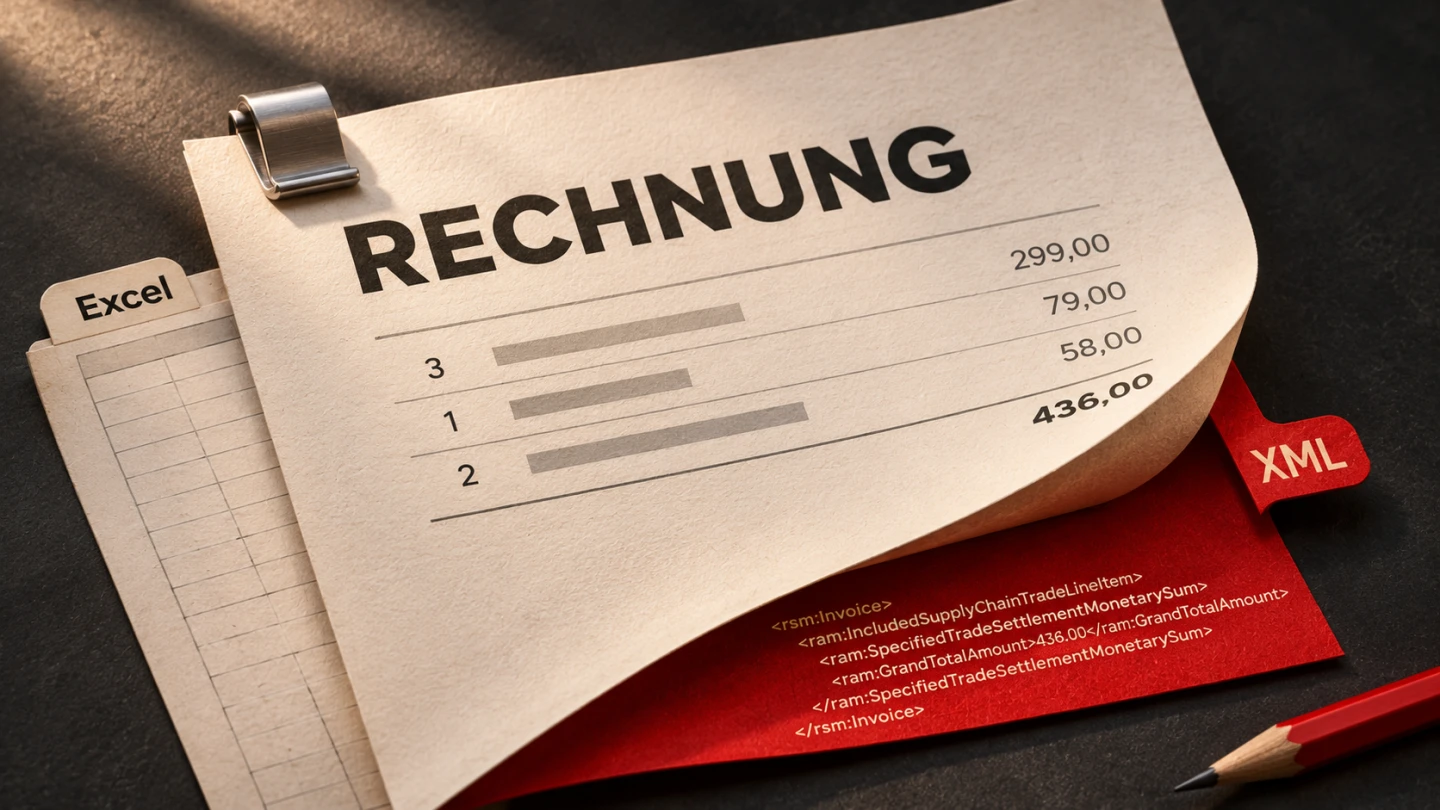
Your Excel invoice template has grown over the years. Layout, line items, tax rates and totals are in place, the result looks good and everyone in the business knows how to use it. In business-to-business transactions, that is no longer enough. A printed sheet or a polished PDF is not an electronic invoice. Anyone currently writing invoices in Excel therefore faces the question of whether an entire enterprise resource planning system is necessary.
In brief: TabellenFaktura is an Excel add-in from Agentur Zentral GmbH. It reads invoice data from an existing Excel template, guides users through the mandatory information step by step and creates either a ZUGFeRD invoice as a PDF/A-3 with embedded XML data or a standalone XRechnung in XML format. Both comply with EN 16931. Everything runs on the user's own computer. The tool is in beta and we are looking for users to try it free of charge and give us feedback.
01 TabellenFaktura / In practice
Excel is the starting point.
The ribbon
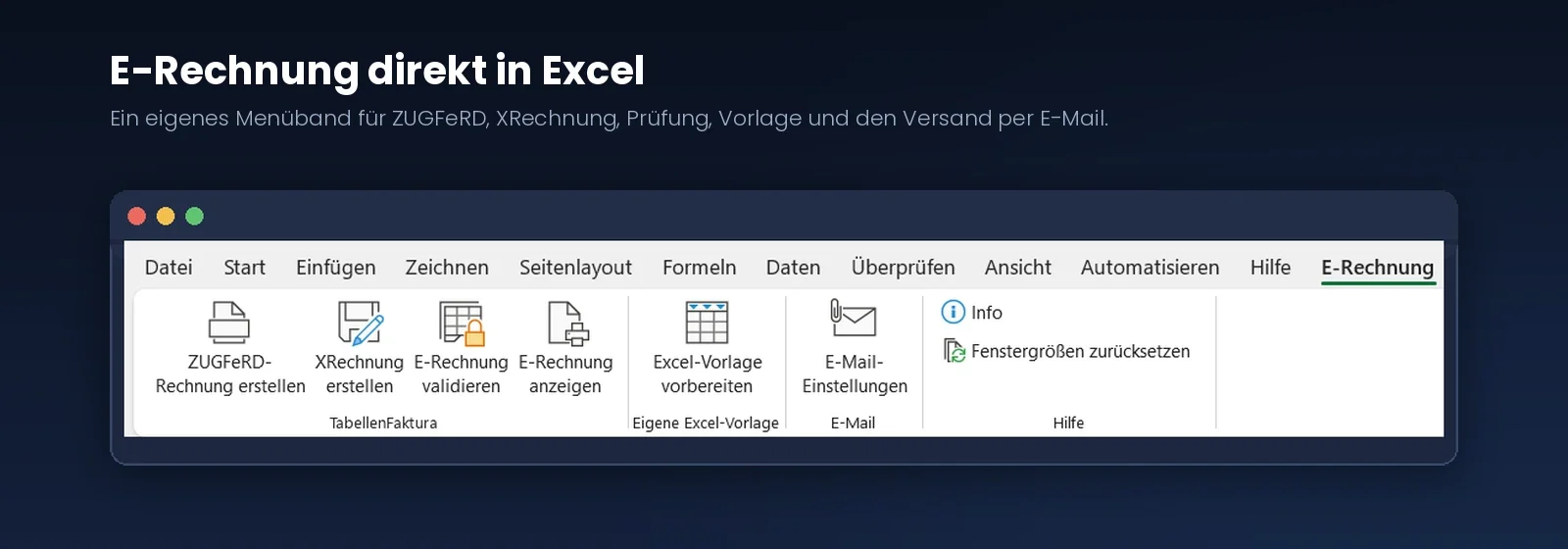
TabellenFaktura at a glance
The assistant starts exactly where invoices are already created. It adds a dedicated ribbon to Excel with eight buttons, six of them for the actual work: creating a ZUGFeRD invoice or XRechnung, validating the generated invoice, displaying it, preparing your Excel template once and setting up the email template. There is also an information window and a helper that resets resized windows.
Two formats, one workflow
The recipient determines the final format. Businesses generally prefer ZUGFeRD because it preserves the familiar visual document. Public-sector customers frequently require a standalone XRechnung. The workflow is the same in both cases; only the final button differs.
Validation concerns the tool's own output. It shows whether the invoice just generated meets the technical requirements. The display function opens its data in a readable form. Neither requires an additional tool or an upload.
There is no need to switch invoicing applications. Invoices continue to be created in the spreadsheet already maintained by the business. Anyone who has spent years developing a template with the right discounts, reductions, recurring items and design often loses more in a system change than new software promises to deliver. The assistant leaves this work intact and adds only the missing part.
02 TabellenFaktura / In practice
Three formats. One clear distinction.
Other invoice
- Human-readable
- No structured data
- Manual transfer of values
- E-invoicing obligations and exceptions apply
Structured XML
- Machine-readable
- No visual PDF included
- Common in public procurement
- Based on EN 16931
PDF/A-3 with XML
- Familiar visual invoice
- Embedded XML data
- One combined file
- Based on EN 16931
Why a PDF is not yet an electronic invoice
The difference is not appearance, but machine readability. Under Germany's VAT Act, an electronic invoice is a structured dataset that the recipient's accounting software can import and process without retyping. A conventional PDF contains text and pixels, but no defined fields for an invoice number, tax rate or payment deadline. In the terminology of the legislation, it is an “other invoice”.
This distinction is often overlooked in everyday work. An invoice saved from Excel as a PDF and sent by email looks like a modern digital invoice. To the tax authority and the recipient's software, it is not. A scanned paper document also remains an “other invoice”, even when it exists as a file. Anyone able to offer both options does not need to resolve this question in advance.
ZUGFeRD or XRechnung
ZUGFeRD solves the problem with a hybrid format. What you see is a normal PDF file that anyone can open and read. Embedded in that file is the same information in machine-readable form. Recipients decide whether to simply view the document or post it automatically. For small and medium-sized businesses, this is the most convenient starting point because nobody has to give up the familiar appearance of their invoices.
XRechnung takes the other approach. It consists exclusively of structured data without a visual document and is primarily required for transactions with public-sector customers. Both formats comply with the same European standard, EN 16931, and the assistant creates both from the same Excel template. The format used simply depends on what the recipient requires.
03 TabellenFaktura / In practice
XRechnung. Check, then create.
Check the details
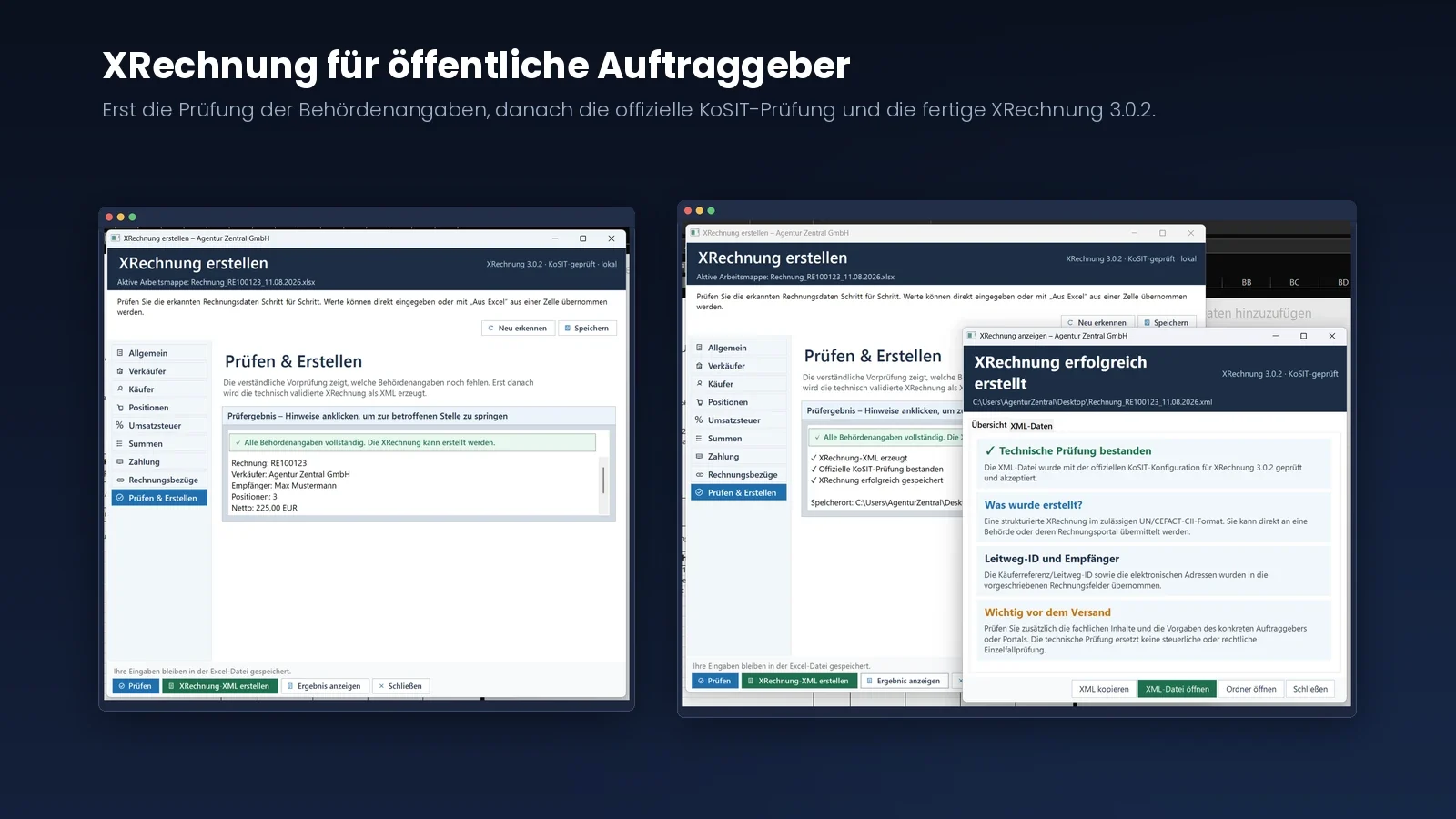
Review the result
XRechnung for public-sector customers
Anyone invoicing government agencies, municipalities or public institutions knows the additional hurdles. Providing a structured invoice is not enough. XRechnung is required, bringing information into play that has no role in ordinary business transactions.
Routing ID and mandatory information
The most important of these is the Leitweg-ID, or routing ID. It determines where within the public administration the invoice is sent. Without it, the invoice is rejected. The assistant displays this field as the buyer reference and warns when it is missing. It also includes the business process identifier and the other mandatory information public-sector customers expect.
Validated with the official tool
The XRechnung is generated in version 3.0.2 in the permitted CII format. To ensure the file does not merely look compliant but actually meets the standard, the assistant checks the result with the KoSIT validator and the official XRechnung validation configuration. Public administration validation services use this same tool.
The check also runs on the user's computer, with the validator included in the application. Anyone creating an XRechnung can therefore see before sending it whether it will be accepted, instead of finding out from the recipient.
What applies and when
04 TabellenFaktura / In practice
The e-invoicing timeline.
- 2025Receive e-invoices
Domestic businesses must be able to receive e-invoices.
- 2025/26Transition period
Paper invoices remain permitted. An ordinary PDF requires the recipient’s agreement.
- 2027First issuing obligation
For domestic B2B transactions where the issuer’s previous-year turnover exceeds €800,000.
- 2028End of the general transition
Structured e-invoices become the general rule for domestic B2B transactions, subject to exceptions.
Exceptions include small invoices up to €250 gross, transport tickets, small-business invoices under section 19 UStG and certain VAT-exempt transactions. Private-customer invoices are not covered by this B2B obligation. Small businesses must still be able to receive e-invoices. Source: Federal Ministry of Finance
Since 1 January 2025, every domestic business in Germany must be able to receive and process electronic invoices from other businesses. Sending is subject to staggered transition periods. During 2025 and 2026, invoices may still be sent on paper or, with the recipient's consent, as a basic PDF. From 2027, businesses with previous-year turnover above €800,000 must send structured electronic invoices. From 2028, the sending obligation applies to all domestic business-to-business invoicing.
Some exceptions remain. Small-value invoices up to €250 gross and travel tickets are exempt. Small businesses under section 19 of the German VAT Act are exempt from sending, but must still receive electronic invoices. Invoices to private individuals are not covered by the obligation.
The second part of the receiving obligation matters. Simply accepting an electronic invoice is not enough. It must be retained so that the structured dataset remains unchanged and readable throughout the retention period. A printout or newly generated PDF does not meet that requirement.
The deadlines may seem generous. In practice, they are closer than they sound because many customers already request structured invoices. Businesses that reach 2027 without making the change will then be negotiating under time pressure. This article describes the technical implementation. It does not replace individual tax or legal advice.
Prepare your template once
05 TabellenFaktura / In practice
Your template stays your template.
The familiar Excel template
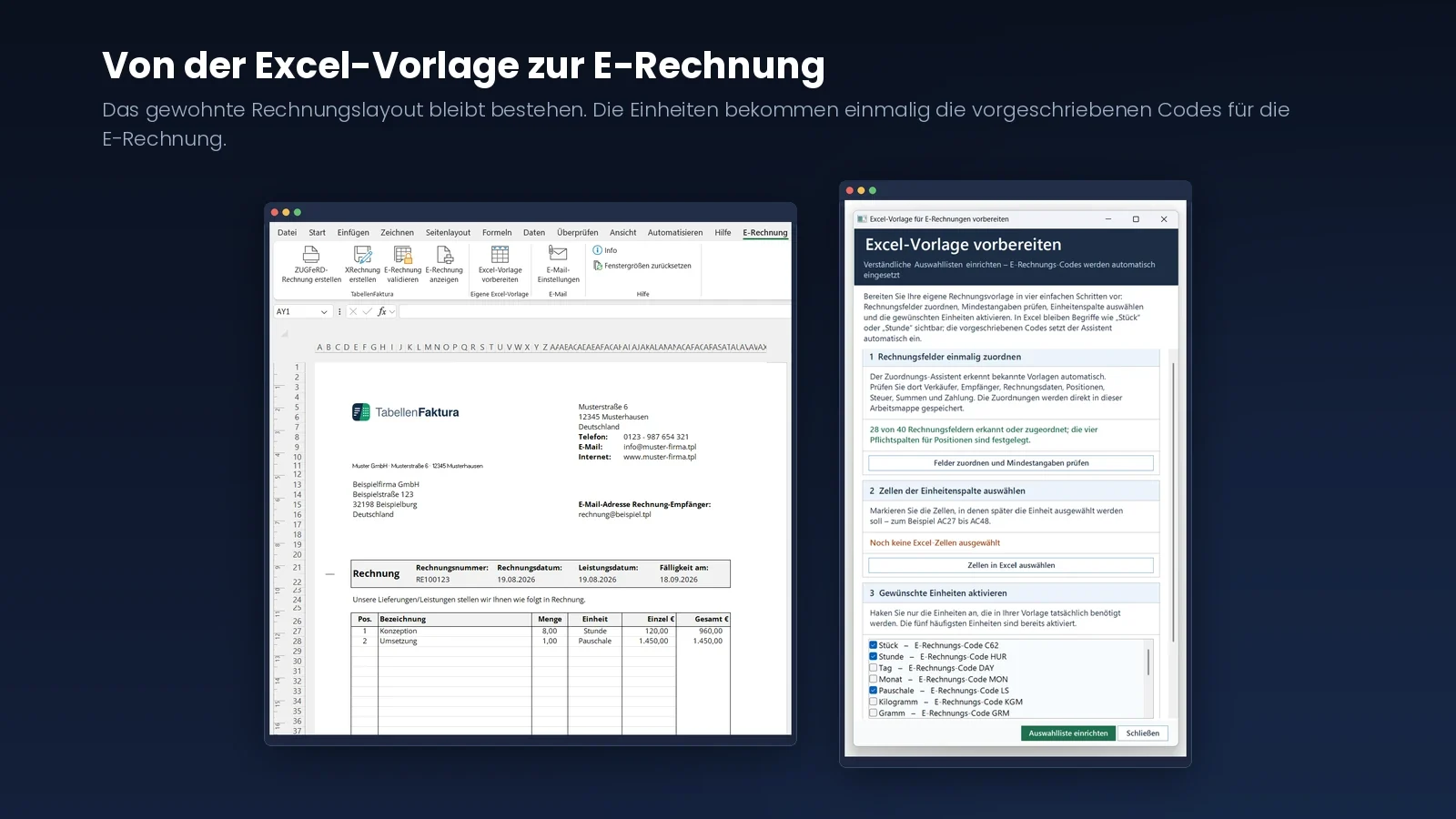
Map units once
Every invoice template is structured differently. A dedicated dialogue therefore makes the template ready in four steps: mapping fields, defining the line-item area and its columns, checking minimum information and activating the units actually needed. The assistant automatically recognises the supplied invoice template.
Units remain understandable
Units are the most important detail in practice. Electronic invoices require standardised codes: C62 for units, HUR for hours, MTR for metres, MTK for square metres or LS for a lump sum. Nobody wants to type those abbreviations into an invoice. Familiar terms therefore remain visible in the spreadsheet and the assistant inserts the appropriate code only when generating the invoice.
Established abbreviations such as the German “Stk.”, “Std.” or “pausch.” are not silently accepted, but shown as a notice that can be corrected. An empty unit field is not simply interpreted as a unit either. This may initially seem strict, but it prevents precisely the errors that recipients notice.
Set up once, keep using it
The mappings are stored as configuration within the workbook itself. They are available again the next time it is opened, leaving only information that changes from invoice to invoice to be adjusted in the assistant. Anyone using several templates, such as separate templates for materials and services, prepares each one once.
06 TabellenFaktura / In practice
Every value has a source.
General invoice details
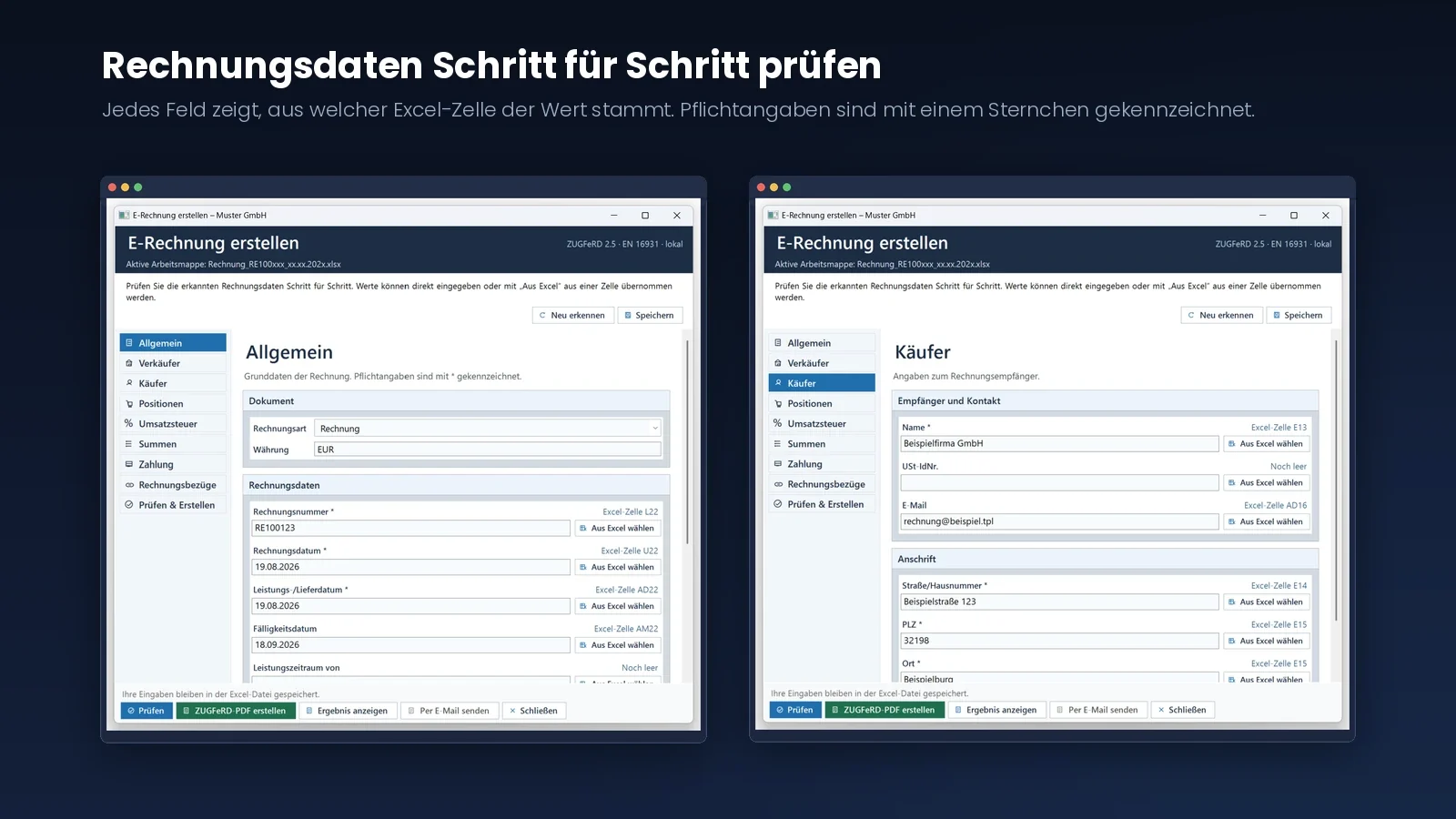
Buyer details
Check invoice data step by step
When launched, the assistant reads the active workbook and suggests which value belongs where. Each field shows its source, for example Excel cell L22 for the invoice number. If a mapping is incorrect, the value can be typed directly or selected from another cell using “Select from Excel”. Fields with no source are labelled “Still empty”.
Nine areas instead of one long list
The assistant is organised into General, Seller, Buyer, Line items, VAT, Totals, Payment, Invoice references and Validate and create. These sections cover all the information a valid electronic invoice needs. Mandatory fields are marked with an asterisk so nobody has to guess which entries are essential.
The available invoice types are invoice, partial invoice, advance invoice, final invoice, credit note and corrective invoice. The line-item area can be defined freely and contain any number of rows. The description, quantity, unit and net price are read for each item; an article number is optional.
Information that does not change only needs to be checked once. Your company details remain stored in the template. Next time, attention can focus on the invoice number, date and line items.
Totals, tax cases and invoice references
07 TabellenFaktura / In practice
Totals in view. References in place.
Compare totals
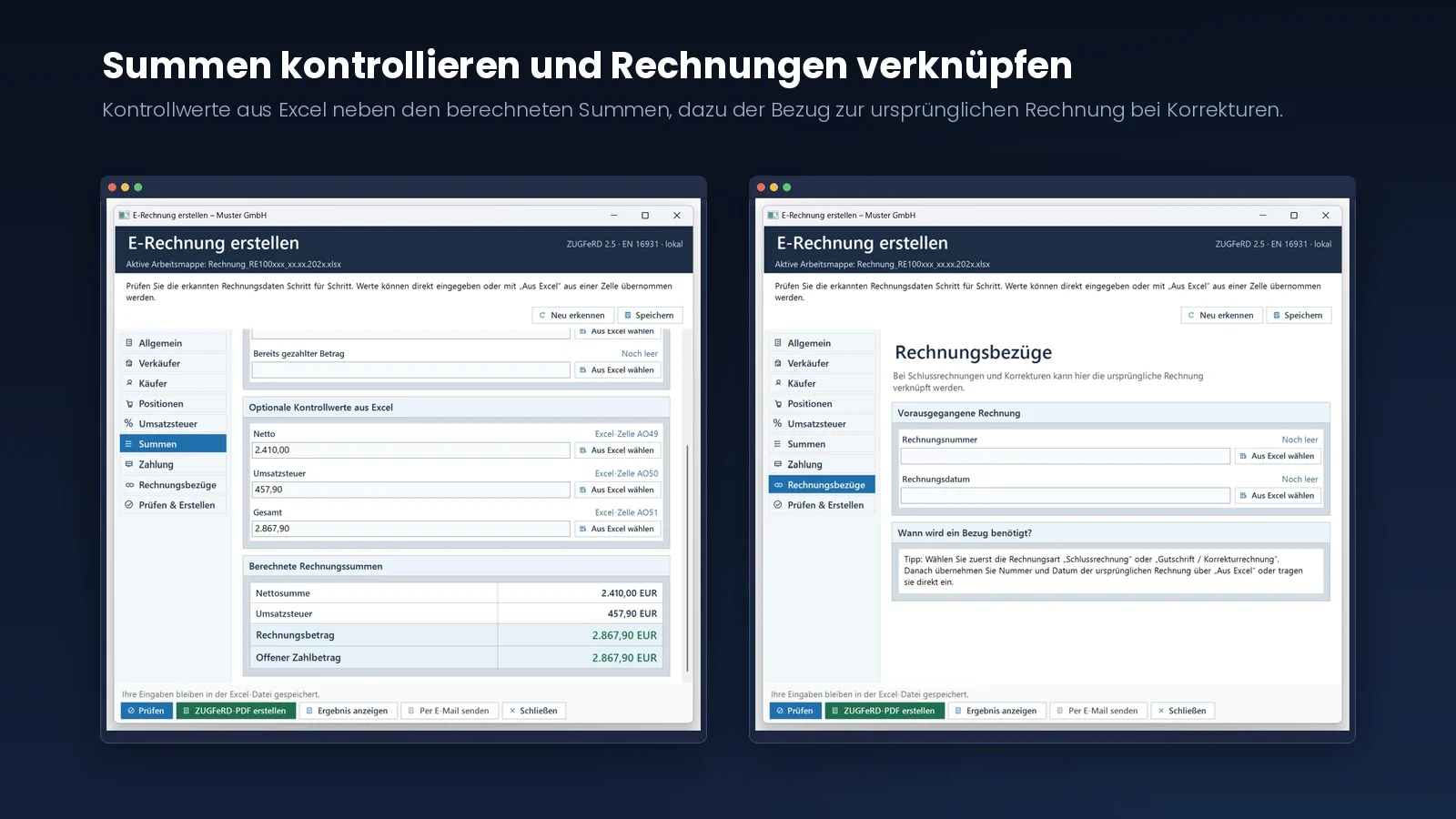
Link invoices
In the Totals section, the assistant shows check values from Excel alongside the invoice totals it calculates itself. Any difference is immediately visible. This is an unobtrusive feature that saves considerable trouble in everyday use: a rounding difference between the visual document and XML data reliably prompts questions from the recipient.
The comparison covers the net total, VAT, invoice amount and outstanding amount payable. Discounts and surcharges applying to the entire invoice can be represented, as can amounts already paid, such as a deposit.
Including the less convenient tax cases
The standard 19 per cent case is quickly handled. Everything else is more interesting. The assistant supports mixed tax rates within one invoice, zero rates, exemptions, reverse charge, intra-community supplies, exports and transactions outside the scope of VAT. Where the standard requires a reason, the appropriate wording can be supplied.
References to earlier invoices
Final and corrective invoices have a dedicated section. Once the appropriate invoice type is selected, the original invoice is linked by number and date. This preserves the relationship between documents in the machine-readable part as well. Manually created corrections often fail at precisely this point.
08 TabellenFaktura / In practice
Check before creating the file.
The validation result
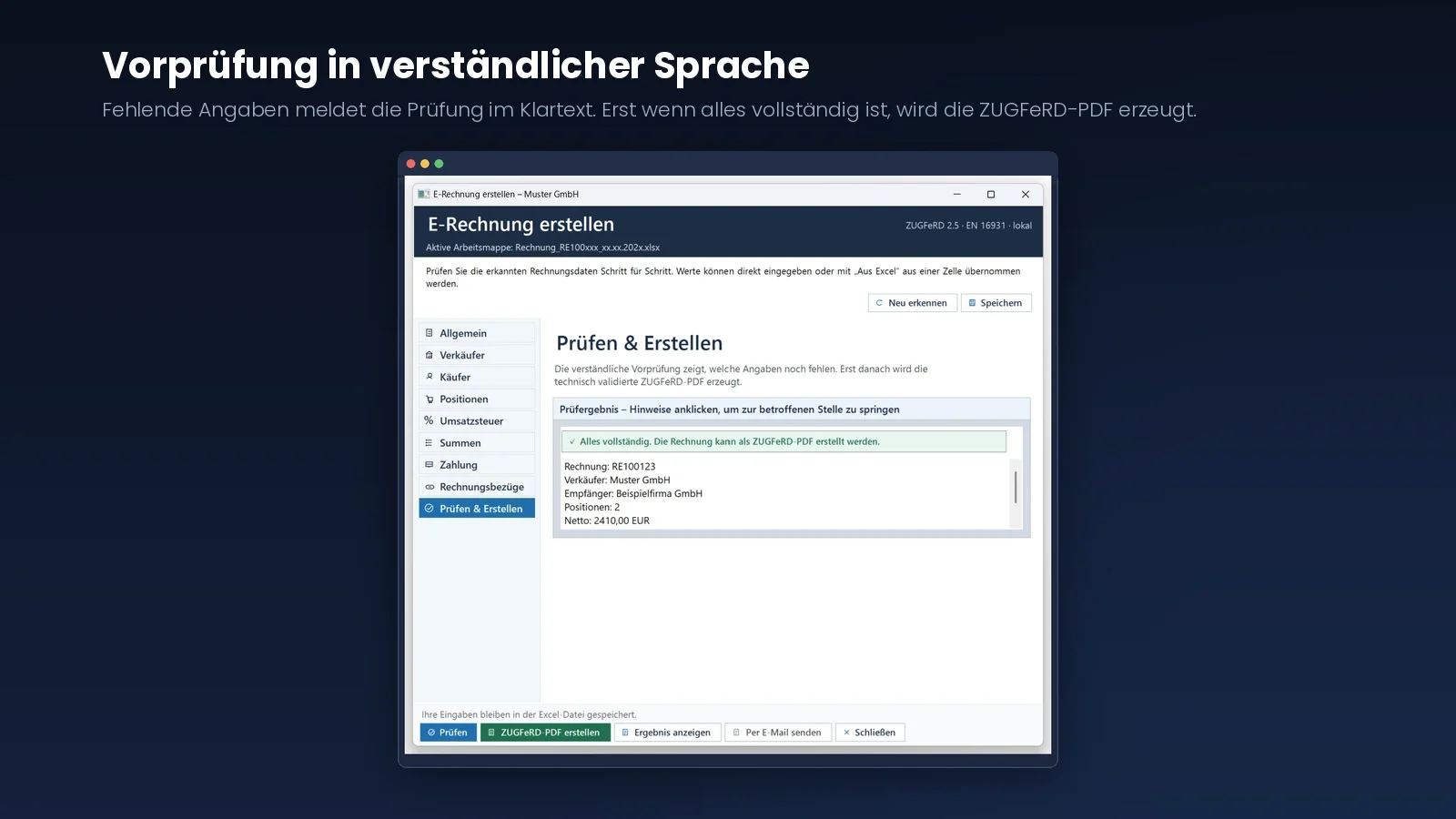
Preliminary checks in plain language
A preliminary check runs before creation. Rather than reporting in technical jargon that an element is missing, it clearly states which information is still outstanding. Instead of a cryptic rule reference, it might say that the seller's postcode is missing or that the country code must contain two letters under ISO 3166-1.
Every notice can be clicked to open the affected section. If an error concerns an invoice item, the corresponding row is highlighted in the preview. Checks include seller and recipient details, tax number or VAT ID, service date and service period, line-item information, IBAN and arithmetic totals. Placeholder text in an unfinished template is also detected.
Two levels of validation
The plain-language preliminary check is only the first level. Technical validation against the standard follows. For ZUGFeRD, Mustangproject performs this twice: first on the generated XML data, then on the finished complete document. For XRechnung, the official KoSIT validator checks against the current validation configuration, using the same tool employed on the recipient's side.
The file is saved only when all stages pass successfully. This order is deliberate. A technically invalid electronic invoice creates work for the recipient. An invoice that is not generated in the first place only requires another click.
09 TabellenFaktura / In practice
One file. Two views.
PDF and embedded XML data
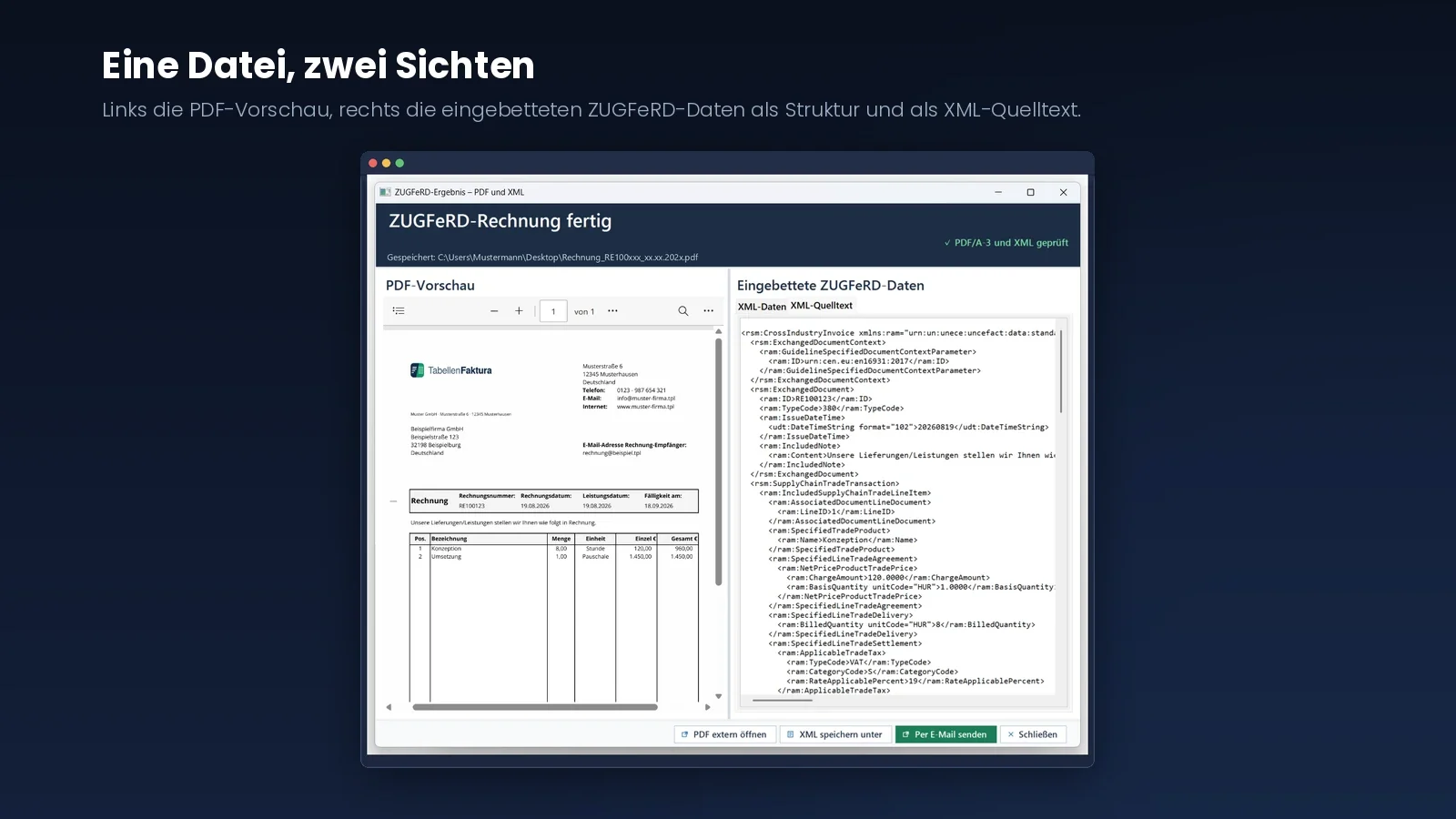
One file, two views
For ZUGFeRD, the result is a single file. On the left, the assistant displays the PDF preview, showing exactly the layout defined by your Excel template. On the right are the embedded data, either as an expandable structure or XML source. For XRechnung, there is no PDF side; the result window shows a readable summary beside the complete source.
This dual view is more than a novelty. It makes clear which values actually reached the machine-readable part. Seeing the invoice number, tax rate, IBAN and line-item amounts correctly represented inspires a different level of confidence from a tool that simply outputs a file.
Where the invoice is saved
The save dialogue suggests the folder containing the open Excel file and adopts its name. The ZUGFeRD invoice receives a PDF extension and the XRechnung an XML extension, keeping spreadsheet and document together. From the result window, users can open the file directly, show its folder, copy or separately save the XML data and send the invoice by email.
Inside the ZUGFeRD file, the structured data are embedded under the required filename. PDF/A-3 is also an archival format, supporting long-term retention. The assistant does not replace an audit-compliant archiving system; that remains the responsibility of the filing system in use.
10 TabellenFaktura / In practice
Prepare the email template once.
Account, signature and message template
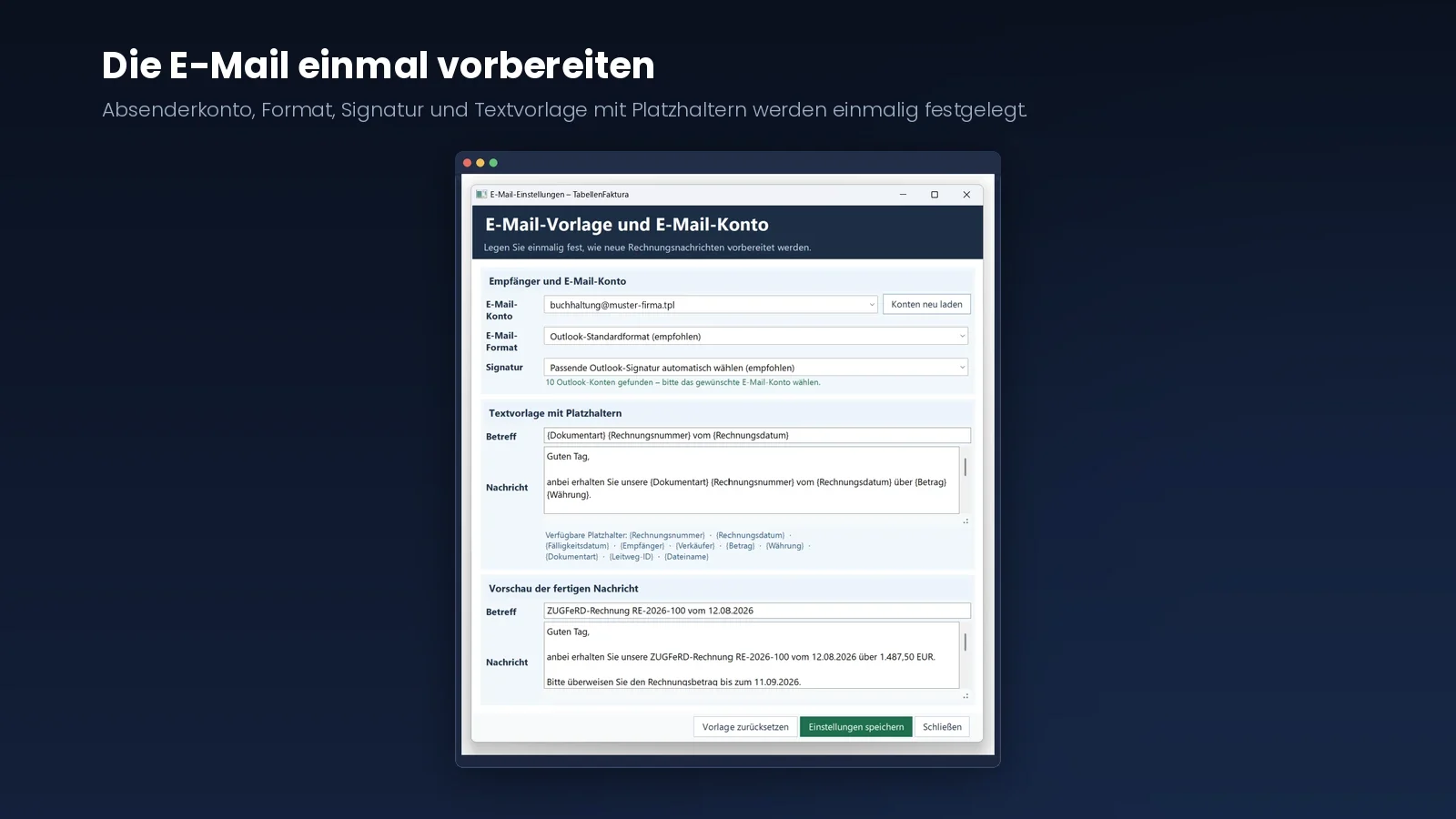
Prepare the email once
A completed invoice is of little use while it remains on the hard drive. The current version therefore closes the final gap in the workflow by preparing the message too. This is set up once through Email settings in the ribbon.
Here, users choose which Outlook account will send the invoice. Anyone using several mailboxes, such as a personal account and an accounting mailbox, selects the correct one. The desired message format and signature are also set. By default, the assistant finds the signature belonging to the selected account. Users who prefer to specify one can choose it manually.
Placeholders instead of copying and pasting
The subject and message are stored as a template. The assistant automatically fills placeholders such as invoice number, invoice date, due date, recipient, amount, currency, document type, routing ID and filename when preparing delivery. A preview directly below shows the finished message.
Every invoice email therefore looks consistent without anyone assembling text snippets.
One click to a completed draft
11 TabellenFaktura / In practice
Ready for the final click.
The prepared Outlook draft
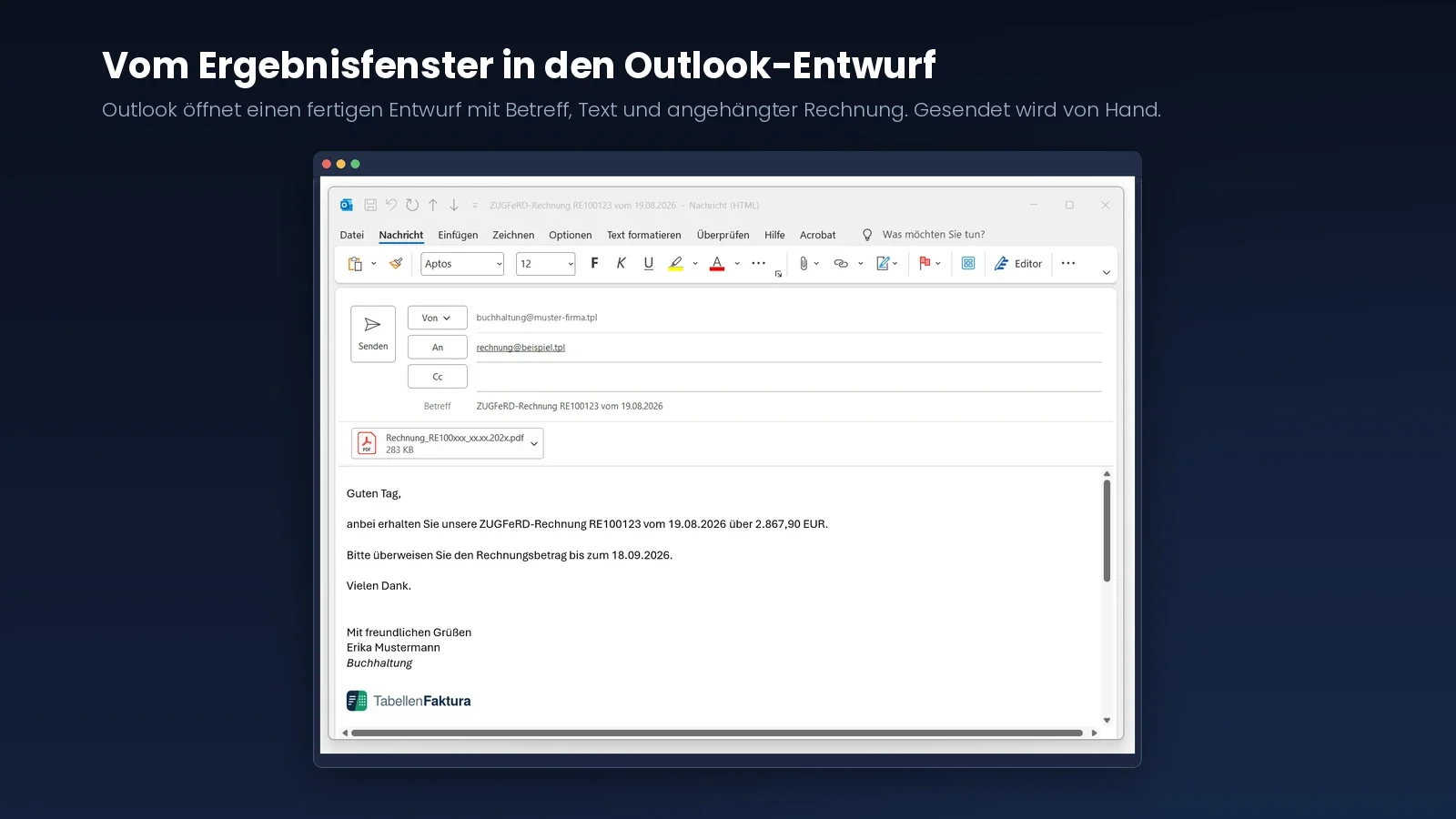
The result window now offers “Send by email” alongside opening and saving. The assistant first displays a short dialogue with the recipient, sending account and template text. It takes the recipient's address from the invoice if one is stored there.
After confirmation, Outlook opens a draft. The subject and message are already filled in, the familiar signature appears below and the invoice is attached. For ZUGFeRD, this is the PDF with embedded data; for XRechnung, it is the XML file.
A person takes the final step
The assistant deliberately sends nothing by itself. It prepares the message and hands it to Outlook. Anyone wanting to add a sentence, copy someone in or postpone sending can do so as usual. Only clicking Send sends the invoice.
In everyday use, that means writing the invoice in Excel, generating it, checking it and sending it. Four steps without switching applications or hunting for a file somewhere in the file system.
12 TabellenFaktura / In practice
Processing stays on your computer.
Technical foundation and notes
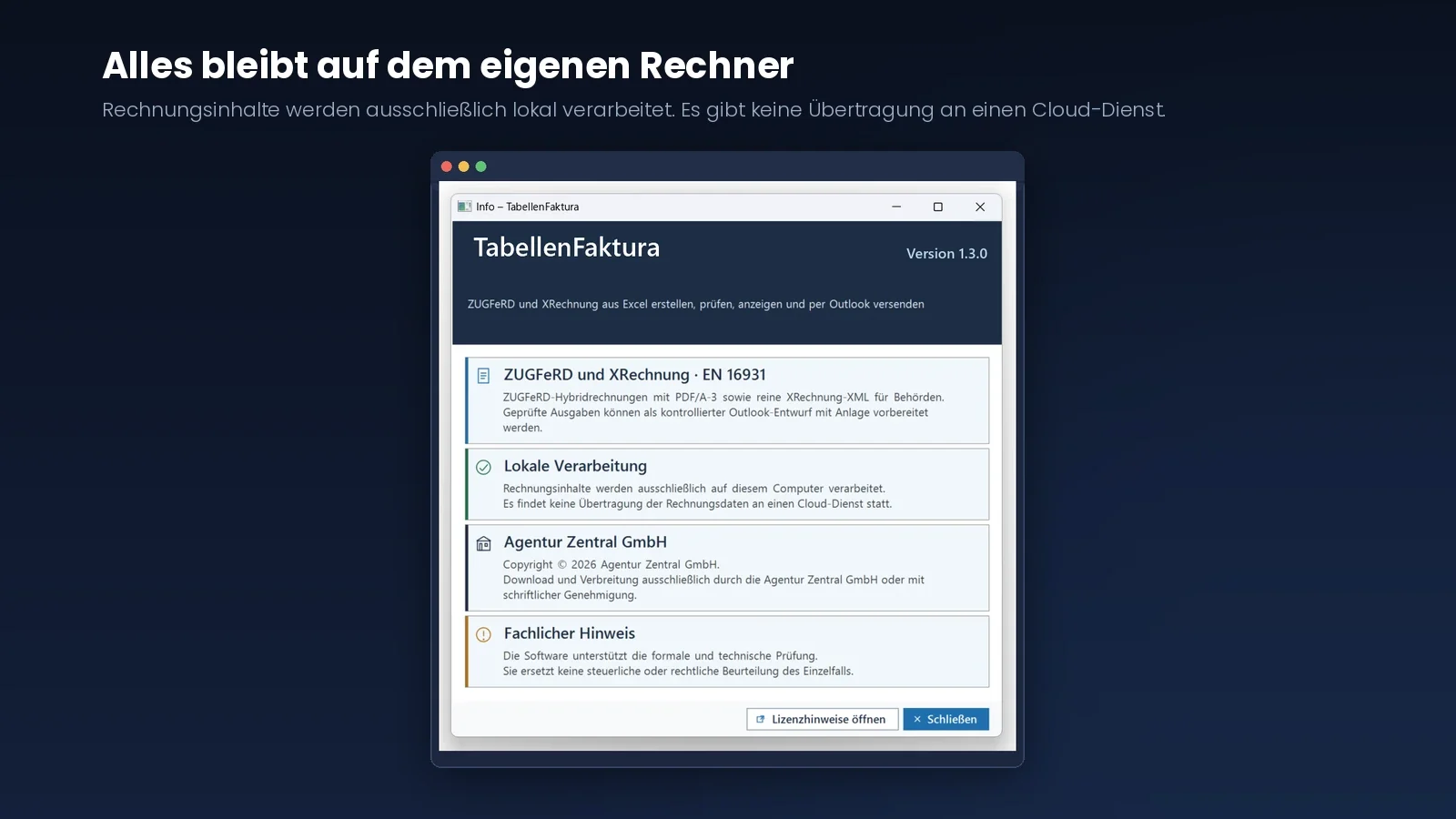
Everything stays on your own computer
Invoices contain customer data, prices and bank details. It was therefore clear from an early stage that these data should not leave the workstation.
The assistant works entirely on your own computer. There is no upload to a cloud service, no user account and no transfer of invoice data to third parties. The email is also simply handed to Outlook on the computer. Even when disconnected from the network, users can continue generating invoices.
Technical foundation
The foundation consists of ZUGFeRD 2.5, XRechnung 3.0.2, the open-source Mustangproject and the KoSIT validator. The outputs are hybrid invoices combining PDF/A-3 with embedded XML and standalone XRechnung files in XML format. Both follow EN 16931, giving the result the same foundation implemented by large ERP systems.
The information window states these details openly, together with the version and a professional disclaimer. The software supports formal and technical validation. It does not replace a tax or legal assessment of an individual case. We deliberately placed that statement in the application, rather than in small print.
Who the assistant is for
The tool is intended for businesses that currently write their invoices in Excel and do not want to change systems. Typical users include trades businesses, freelancers, agencies, associations with commercial activities, property managers and small service providers with manageable invoice volumes.
In daily use, the assistant answers these questions:
- How can an existing Excel template become a valid electronic invoice?
- Which mandatory information is still missing?
- Do the XML totals match the spreadsheet totals?
- What is actually inside the generated file?
- Will the invoice pass the recipient's technical validation?
For companies with high invoice volumes, integrated inventory management or automated approval processes, an ERP solution remains the better choice. The assistant fills a smaller gap, but does so very specifically.
Limitations worth knowing
The assistant creates and validates electronic invoices. We prefer to state what it does not do beforehand rather than afterwards:
- It is not an invoicing application and does not maintain an invoice numbering register.
- It prepares delivery as an Outlook draft but sends nothing automatically.
- It does not submit invoices to an invoice portal or a network such as Peppol.
- It does not replace accounting or audit-compliant archiving.
- It does not know the individual requirements of particular customers or portals.
- It does not assess whether the selected tax rate is correct for the individual case.
A technical check only establishes whether an invoice meets formal and technical rules. Whether prices, services and tax classification are correct remains the responsibility of the business and its advisers. We state this boundary deliberately because a green tick does not replace professional assessment.
Beta testers wanted
TabellenFaktura is currently at version 1.3.0 and is being continuously developed. After XRechnung, the latest addition was email delivery. Completed invoices can now go straight into a prepared Outlook draft. For the next stage, we are looking for businesses to use the tool in real daily work.
As a beta tester, you use the assistant free of charge. In return, we want to know how it works with your invoice template, which fields are not recognised, which units are missing and where wording is unclear. Every piece of feedback feeds into the next version. Early users help shape the tool.
What you need
The assistant is installed as an add-in on Windows 10 or Windows 11 and requires Microsoft Excel 2016 or later as a desktop application. Excel can be 32-bit or 64-bit; the operating system must be 64-bit. The .NET Framework 4.8 and administrator rights for installation are also required. Excel Online and Excel for Mac are not supported.
The email function requires the Microsoft Outlook desktop application. Without Outlook, all other functions continue unchanged; the invoice is saved and manually attached as before.
No prior knowledge of ZUGFeRD or XRechnung is required. That is precisely how we find out whether the interface is understandable.
Software from the agency
Agentur Zentral GmbH develops custom websites and web applications. Another focus is simplifying workflows. This leads to original software, integrations between systems, reporting for everyday operations and tools such as TabellenFaktura.
The approach is always the same: a concrete practical problem, a solution requiring as little adjustment as possible and an implementation that keeps data where they belong. If you have a task that standard software handles awkwardly, get in touch.
Conclusion: the short route to electronic invoicing
The electronic invoicing obligation does not force anyone to discard a functioning invoice template. It simply requires a structured dataset alongside the visual document. TabellenFaktura handles exactly that without changing the familiar workflow.
The invoice is still written in Excel. An extra click at the end produces a ZUGFeRD invoice that meets EN 16931. For many small businesses, this is currently the most pragmatic route to electronic invoicing.
Frequently asked questions
Here are short answers to the main questions about TabellenFaktura.
Can I create a ZUGFeRD invoice with Excel?
Yes. With TabellenFaktura, the invoice stays in Excel and the assistant turns it into a ZUGFeRD PDF/A-3 invoice with embedded XML data under EN 16931. Alternatively, it outputs a standalone XRechnung in XML format. No other invoicing application is needed.
Is a PDF invoice from Excel an electronic invoice?
No. A PDF without structured data counts as an “other invoice”. Only an embedded XML file makes it an electronic invoice under the German VAT Act.
What is the difference between ZUGFeRD and XRechnung?
ZUGFeRD is a hybrid format combining a visible PDF file with embedded XML data. XRechnung is a pure XML format without a visual document and is widely used with public-sector customers. Both comply with European standard EN 16931. TabellenFaktura creates both formats from the same Excel template; you choose when creating the invoice.
When must I start sending electronic invoices?
Domestic businesses have had to receive them since 1 January 2025. Sending becomes mandatory in 2027 for businesses with previous-year turnover above €800,000, and in 2028 for all domestic business-to-business invoices. Small-value invoices up to €250 gross and travel tickets remain exempt.
Do I need to rebuild my invoice template?
No. Its layout and structure remain. The assistant maps existing cells to invoice fields and adds a unit selection list if required. This preparation is needed once and is stored in the Excel file.
Are my invoice data transferred to a cloud?
No. Processing takes place exclusively on your own computer. There is no user account and no transfer of invoice content to a cloud service.
What does TabellenFaktura cost?
Use is free for testers during the current beta phase. Only feedback on errors and clarity is expected.
Does TabellenFaktura replace my accounting?
No. It creates and validates electronic invoices. Bookkeeping, numbering sequences, payment reminders and individual tax assessments remain outside the tool.
Does the assistant send my invoices automatically?
No. It prepares the message and opens an Outlook draft with the subject, text, signature and attachment already in place. The invoice is sent only when you click Send.
Do I need Outlook to send invoices?
For the integrated email function, yes: the Outlook desktop application is required. All other functions work independently. Without Outlook, save the finished invoice as usual and send it with your normal email application.