Explain app permissions and request access sparingly
From a concrete task to an appropriate interface: distinguish platforms, check contents and ignore obsolete results after clearing.

An app needs to attach one picture to an entry. Yet its first launch requests location, camera access and the entire media collection. This often starts as an implementation shortcut: enable everything a later feature might use. The person holding the device cannot tell which current task requires which access. A stronger design starts before the permission prompt. It identifies the intended action and finds a narrowly scoped way to complete it.
This guide connects product decisions with a complete web example: display a reading list from one explicitly selected JSON file. The application does not need access to a directory. The example does not imitate an Android or iOS permission dialog. It demonstrates how a smaller feature can avoid a broader form of access. Technical sources were checked on November 9, 2026. Specific system dialogs still need verification against the platform versions the actual product supports.
Describe the task before choosing the access
A request for permission is not a feature description. “We need photos” does not explain whether someone wants to select one profile picture or whether a substantial library management feature must inspect a larger collection. Begin with a full sentence from the person's perspective: “I want to attach this picture to my entry.” Then select an interface that enables that action with as little additional reach as practical. This sequence makes the permission a consequence of the feature.
The smallest useful solution does not necessarily have the shortest dialog. Scope, timing, duration and subsequent processing all matter. An unobtrusive operation reading a large collection may reach further than a clearly explained one-time selection. Previously granted access also does not establish that a new feature needs the same information. Repeat the access review when requirements change instead of treating it as a question settled at the first release.
| Intended action | Narrow route to examine first | Additional question |
|---|---|---|
| Attach one picture | System selection of individual pictures | Must the app inspect any other pictures? |
| Find a shop | Enter a place or postal code | Does the task require a current position? |
| View a reading list | Explicitly select one file | Why would a directory be necessary? |
| Receive a reminder | Offer notifications when configuring the reminder | What remains available without notifications? |
This table supports design decisions. It does not claim that all interfaces are interchangeable. An entered place cannot replace a moving position in every navigation scenario. A single picture selection will not satisfy every library management requirement. The benefit is making broader access require a reason. A library that asks for a larger permission by default does not provide that reason on behalf of the product team.
Separate four different boundaries
System permissions, file selection, account authorization and the legal assessment of data processing belong to different layers. An operating system may allow microphone access. That does not authorize an account to add every recording to another person's project. A person may select a file. That alone does not explain whether the application intends to publish it or send its contents to another service. The interface should make the actual proposed action understandable.
This article addresses implementation and interaction design. It does not equate a system click with legally valid consent or derive a universal legal basis from it. A real product needs its own assessment of responsibility, purpose, recipients and applicable legal requirements. Those questions become particularly important when analytics, external processing or shared accounts are introduced. Narrow operating system access reduces one technical scope. It does not resolve all subsequent uses of the selected information.
Document a compact access map for each feature: triggering action, affected information, chosen interface, reach, processing and fallback when access is unavailable. Name the person responsible for reviewing changes to that map. A later release can then identify when a one-time import has quietly become continuous synchronization. Either feature may have a legitimate product purpose. They still need different explanations, retention decisions and acceptance checks.
Review Android and Apple implementations separately
The Android documentation for runtime permissions describes contextual requests and handling refusal. A grant obtained previously should not be treated as an immutable application property. Check the required permission again before the protected operation. The feature must know what cannot run without access and which other parts can remain useful. This requires product states rather than a single global success flag.
For pictures, examine the Android Photo Picker as a route to an explicitly limited selection. Whether it meets the requirement depends on the intended workflow and supported environment. The browser code in this article is not an implementation of that native Android interface. Native integration, returned values and any later reuse of selected content require their own engineering work and tests.
Apple's privacy design guidance emphasizes an understandable need and concrete purpose descriptions. Do not make a custom introductory view look like a system prompt that already expects agreement. The platform has specific guidance for views preceding system alerts. Avoid turning a general product principle into one supposedly universal dialog template. An optional feature entry point and the exact sequence immediately before a system alert are separate design questions.
For native apps, maintain a test matrix combining platform version, previous authorization state and the feature being invoked. A freshly installed app is only one case. Also change access in system settings and invoke the feature again. Whether another prompt appears cannot be generalized from a convenient development session. Background access needs an independent review and should never be inferred silently from authorization intended for a different context of use.
A bounded import instead of directory access
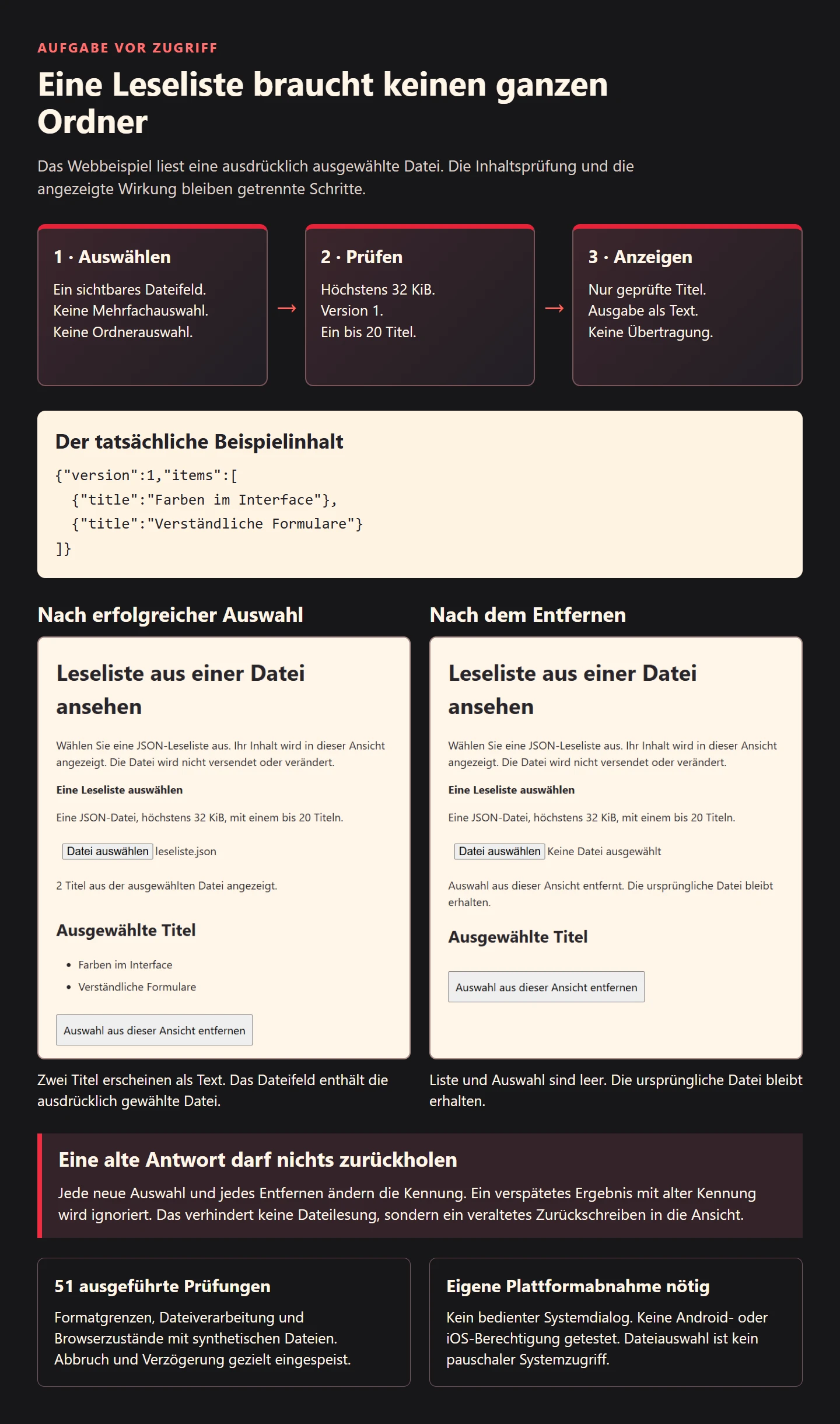
The example has a deliberately small job: someone selects a JSON reading list containing no more than 20 titles. The view displays those titles. It does not modify the source file, transmit its contents or persist the selection. These are properties of this particular implementation. A file picker by itself does not guarantee that another application will avoid uploading selected content. Review the entire path after selection, including helpers and later feature changes.
The file field has neither a multiple-file attribute nor a directory-selection attribute. Its accept value only helps suggest suitable files. The HTML file input reference explains that this hint does not replace validation. Our checks deliberately supply a plain text file containing valid JSON. It can be read successfully. The extension and reported media type do not determine whether the contents satisfy this application's data contract.
The format contains exactly two properties, version and items. Version one holds a list of objects with exactly one title each. Additional properties are rejected. The 32 KiB ceiling is a product decision for this small example, not a platform-wide limit. The maximum of 20 entries and title length of 200 JavaScript code units are also explicit example limits. A visible character may comprise more than one code unit, so this is not a promise about a fixed number of visible symbols.
{"version":1,"items":[{"title":"Farben im Interface"},{"title":"Verständliche Formulare"}]}The complete reading function
The initial check happens before reading. After reading, the function also checks the UTF-8 size of the resulting text. In this example, that catches a deliberately substituted test object reporting an incorrect size. Real browser files and injected test objects are different things. The second boundary does not turn the function into a general file scanner or protection against every possible resource attack. Its job remains the bounded reading of one specified format.
export const MAX_BYTES = 32768;
export async function readList(file) {
  if (!file || !Number.isSafeInteger(file.size) || file.size < 0 || file.size > MAX_BYTES || typeof file.text !== 'function') {
    throw new TypeError('Datei darf höchstens 32 KiB groß sein.');
  }
  const text = await file.text();
  if (typeof text !== 'string' || new TextEncoder().encode(text).length > MAX_BYTES) throw new TypeError('Datei ist zu groß.');
  let data;
  try { data = JSON.parse(text); } catch { throw new TypeError('Datei enthält kein gültiges JSON.'); }
  if (!data || Array.isArray(data) || Object.keys(data).sort().join(',') !== 'items,version' || data.version !== 1 ||
      !Array.isArray(data.items) || data.items.length < 1 || data.items.length > 20) throw new TypeError('Format der Leseliste ist ungültig.');
  const items = data.items.map(item => {
    if (!item || Array.isArray(item) || typeof item !== 'object' || Object.keys(item).join(',') !== 'title' ||
        typeof item.title !== 'string' || item.title.trim().length < 1 || item.title.trim().length > 200) {
      throw new TypeError('Ein Titel ist ungültig.');
    }
    return {title: item.title.trim()};
  });
  return items;
}
The text() method completes asynchronously. The text method documentation describes its UTF-8 interpretation. Our exchange format assumes that encoding. Other formats would need an explicit encoding decision. This function also does not use a separate parser to reject duplicate raw JSON property names: it follows JSON.parse behavior. A system requiring unique raw property names would need an additional suitable check rather than a stronger claim about this implementation.
The function returns newly created result objects and trims whitespace around titles. It does not forward the entire input or unknown fields. A structurally valid title remains untrusted content. The output operation determines whether that content becomes text or interpreted markup. The view therefore belongs in the same review as the parsing function. Correct structure does not substitute for correct output handling, especially when the same information may later appear in another screen.
The complete view and its states
Place the following view and the reading module in the same directory and serve them through a development server. The interface uses a visible native file field with an associated label. Help text states the format and boundaries. A status reports the actual result. The removal button explicitly refers to this view. It does not claim to delete the source file or revoke a broader operating system permission.
<!doctype html><html lang="de"><meta charset="utf-8"><title>Leseliste aus einer Datei ansehen</title><meta name="viewport" content="width=device-width,initial-scale=1">
<style>body{font:20px/1.5 system-ui;max-width:48rem;margin:2rem;background:#fff6e8;color:#29252a}input,button{font:inherit;padding:.7rem}button{margin-top:1rem}*:focus-visible{outline:3px solid #bd1741;outline-offset:3px}label{font-weight:bold;display:block}li{margin:.6rem 0}#status{min-height:3rem}</style>
<h1>Leseliste aus einer Datei ansehen</h1><p>Wählen Sie eine JSON-Leseliste aus. Ihr Inhalt wird in dieser Ansicht angezeigt. Die Datei wird nicht versendet oder verändert.</p>
<label for="source">Eine Leseliste auswählen</label><p id="help">Eine JSON-Datei, höchstens 32 KiB, mit einem bis 20 Titeln.</p><input id="source" type="file" accept=".json,application/json" aria-describedby="help">
<p id="status" role="status">Noch keine Datei ausgewählt.</p><h2>Ausgewählte Titel</h2><ul id="items"></ul><button id="clear" type="button">Auswahl aus dieser Ansicht entfernen</button>
<script type="module">
import {readList} from './read-list.mjs';
const input=document.querySelector('#source'),status=document.querySelector('#status'),list=document.querySelector('#items');let generation=0;
function show(items){list.replaceChildren(...items.map(item=>{const li=document.createElement('li');li.textContent=item.title;return li;}));}
input.addEventListener('change',async()=>{
 const current=++generation,file=input.files?.[0];show([]);
 if(!file){status.textContent='Keine Datei ausgewählt.';return;}
 status.textContent='Leseliste wird gelesen.';
 try{const items=await readList(file);if(current!==generation)return;show(items);status.textContent=items.length+' Titel aus der ausgewählten Datei angezeigt.';}
 catch{if(current!==generation)return;show([]);status.textContent='Diese Datei konnte nicht als Leseliste gelesen werden. Prüfen Sie Format und Größe.';}
});
input.addEventListener('cancel',()=>{status.textContent=list.children.length?'Keine neue Auswahl. Die bisherige Ansicht bleibt erhalten.':'Keine Datei ausgewählt.';});
document.querySelector('#clear').addEventListener('click',()=>{generation++;input.value='';show([]);status.textContent='Auswahl aus dieser Ansicht entfernt. Die ursprüngliche Datei bleibt erhalten.';});
</script></html>
Rendering uses textContent. A title resembling an HTML image element therefore appears as text and does not create an image element. When someone chooses a new invalid file, previous titles are cleared first. An earlier successful selection cannot then masquerade as the new result. Cancelling a subsequent file selection instead keeps the already displayed list. The status distinguishes those outcomes instead of reporting both as a successful import.
The generation variable handles another practical issue. While a file is being read, someone may clear the selection or choose a different file. An old result arriving later must not overwrite that newer decision. Every new selection and removal changes the generation identifier. Only a result matching the current identifier can update the view. Cancelling a new chooser does not stop an earlier read already in progress. It simply does not make a new selection.
This distinction matters beyond file imports. Address searches, location requests and remote previews can also finish in an order different from the order in which they started. A stale result should not silently restore data after a person has intentionally removed it. Cancellation and ignoring obsolete results are related but different mechanisms. The example implements the latter for an already running read. It does not claim to cancel the underlying operating system operation.
What the 51 checks actually establish
The executed check run contains 51 successful conditions. Function-level cases include valid single and multiple entries, the exact byte boundary, missing fields, additional properties and invalid titles. An intentionally triggered read failure must propagate. The number describes this particular record, not a general security rating. Adding more assertions would not automatically provide stronger coverage if all of them repeated the same behavior. Relevant counterexamples matter more than a large total.
| Observation | Executed counterexample | Evidence boundary |
|---|---|---|
| Selection remains narrow | One file field without multiple or directory attributes | No mobile system permission tested |
| Contents are checked | Invalid JSON and unexpected properties | No universal file scanner |
| Untrusted title remains text | HTML syntax does not create an element | Other output destinations need review |
| Removal stays effective | A delayed result arrives after clearing | The original file still exists |
The browser run used Edge with synthetic files supplied to the file field by the test tool. The browser then processed actual file objects and updated its document. The operating system chooser was not operated. The cancellation event and a delayed reading result were deliberately injected. This boundary is essential: the evidence concerns the implemented view. It does not establish tested Android or iOS authorization behavior or spoken output from a screen reader.
During that flow, the checks also observed no POST request and no request to a different origin. The flow left no entries in localStorage or sessionStorage. This does not describe browser caches, operating system logs or other applications. It supports the narrower implementation claim: the example does not send the file contents and does not persist the reading list in those web stores. A later integration must repeat the observation rather than inherit it automatically.
Make refusal an ordinary product state
Apply the same discipline to features requiring actual system permissions. Refusal should be an expected state rather than an exceptional product failure. Explain which selected operation could not happen. Avoid repeated requests on every navigation event. A further explanation can be useful when someone deliberately invokes the affected feature again and the platform provides an appropriate route. The current system state determines that route, so the application needs more than a remembered initial answer.
Distinguish not yet requested, refused, currently available and no longer available. Add domain-specific intermediate states such as recording in progress or a partially imported collection when those states actually exist. A reduced feature can still be useful. It must not claim that recording, position retrieval or a reminder was successfully configured when a necessary prerequisite is missing. An honest outcome helps someone decide what to do next more than an unexplained green indicator.
Do not use fallback wording to conceal a changed action. Entering a city manually is different from sharing an exact location. Selecting one picture is different from granting a library management feature ongoing reach. Name these alternatives according to what they do. If the wider feature is essential to the selected task, explain that limitation directly and let the person choose another task. Avoid making unrelated features unusable simply because an optional permission was refused.
A checklist for the next release
Acceptance also needs an explicit account of retained state. Remembering a file name is different from retaining its contents. Keeping an internal record identifier does not necessarily preserve access to the original file. A preview can itself contain sensitive information. Avoid saying that a selection is saved when the implementation only remembers a title. In this example, clearing removes the displayed titles and file field selection. It does not delete the original. Reloading starts without a reading list because this implementation has no persisted list.
Review error messages as product decisions too. The reading function distinguishes several invalid inputs while the small interface presents one understandable message. A larger import may need more specific guidance about format version or entry count. Record the cause, visible message, possible next action and remaining data for each case. Do not automatically print raw file contents or internal exceptions as advice. The useful message tells someone how to make a successful next attempt without suggesting that a failed operation already happened.
A shared permission manager can standardize technical states and reduce duplicate requests. It cannot decide why every feature needs information or which alternative still makes sense. Keep that domain knowledge with the feature's access map. Include actual chooser behavior, return focus, translated explanations and enlarged text in manual acceptance. Keyboard focus in one browser assertion provides useful evidence, but it does not establish complete usability across operating systems and assistive technologies.
- Is the intended action described in a concrete sentence?
- Was a narrow selection route considered before broad access?
- Does the interface explain the purpose and actual processing path?
- Are system access, account rights and legal assessment documented separately?
- Does the request concern the feature currently being used?
- Are refusal and later revocation usable states?
- Are selected contents checked independently of extensions?
- Can an old asynchronous response overwrite a newer decision?
- Do removal, saving and transmission each describe their real effects?
- Does acceptance include relevant device workflows alongside automated checks?
Keep the reviewed revision, platform versions and observed limitations with each release record. Review again when a library replaces the chooser, an import starts sending content to a server or another purpose is introduced. The original explanation can then become inaccurate even if the file field looks unchanged. Sparse permission requests are therefore an ongoing engineering outcome. They depend on a comprehensible task, a suitable interface and a processing path that can actually be checked.