Improve an existing Excel solution sensibly
Move from an existing file to a verifiable next step using a data dictionary, import rules and an executed validation example.

Many useful business solutions start as spreadsheets. Someone collects customer information, adds a calculation and produces a report. More sheets, links and exceptional cases accumulate over time. Knowledge about the workflow then lives partly in the file and partly in the minds of the people who use it.
This article develops a gradual improvement using a fictional order list. It examines data quality, understandable calculations and controlled transfer. The JavaScript example validates records that have already been read. It neither opens workbooks nor replaces a complete importer or accounting application. Every example record is invented.
1. Understand the work the file actually performs
Describe a complete transaction: where does information originate, who adds to it, which calculation follows and who uses the result? Do not inspect only the attractive summary sheet. Ask someone to demonstrate how a new row is created, an error is corrected and a monthly review is prepared.
Distinguish the file from the business task. A sheet called “Customers” might combine master records, orders and outstanding questions. Those three subjects may need different owners. Rebuilding the existing layout without understanding this mixture preserves the confusion, leaving unexpected side effects to be discovered after the new solution is introduced.
Create a small inventory of sheets, named tables, important formulas, external links, queries and any macros. Record where the file is stored and which version is actually used. Otherwise a copy on another computer can quietly become a second authoritative data source, with neither team knowing which changes should take precedence.
Initially document the existing workflow without judging every manual step. An intermediate review may have an important business purpose. Removing it makes sense only after understanding the decision it supports. A useful improvement eliminates unnecessary work while preserving the controls that the organisation still needs.
2. Preserve an unchanged baseline
Work on an explicitly named copy and preserve the source file unchanged. Record the date, origin and people involved. If several files are linked, include that relationship in the backup. One workbook is not a complete baseline when its results depend on a separate source file that has not been retained.
Check that the saved version can actually be opened and used with its necessary sources. A file's presence does not establish recoverability. A bounded exercise using copies can be sufficient for a small trial. Avoid invoking real sending or production write actions merely to verify a calculation.
Select representative cases as well as routine rows. Include leading zeros, missing values, an unusual date and a repeated key. Keep expected outcomes separate from the calculation being improved. Otherwise the same mistaken assumption can affect both the source calculation and the supposed check of its correctness.
Agree on a controlled return path. Who records new transactions during the trial? When may the new version become authoritative? Which changes would need carrying back if the trial is reversed? A seemingly minor workbook change can otherwise create divergent records that require a difficult comparison later.
3. Create a small data dictionary
Every important field needs a business meaning. Our order list has a five-digit identifier, a document date and a non-negative amount with two decimal places. These are teaching-example rules only. Other records may require longer identifiers, negative corrections or more currencies, and must define their own rules accordingly.
| Field | Example | Defined meaning |
|---|---|---|
| Identifier | 00017 | Text containing exactly five digits, preserving leading zeros |
| Date | 2026-10-01 | A calendar day in the agreed interchange format |
| Amount | 1.234,50 | A non-negative euro amount using German numeric notation |
| Status | checked | A value from a defined business list |
An identifier is not a quantity for arithmetic merely because it contains digits. Converting “00017” to the number 17 can lose a meaningful property. Applying a five-digit display format afterwards does not establish the original character sequence. It changes presentation rather than documenting where that value came from.
Define missing values and uniqueness as well. Does an empty date mean “not entered yet”, or is it invalid? Can the same identifier legitimately describe several transactions? A general duplicate search helps only after deciding which key must be unique and which repeated values are valid business information.
4. Distinguish source data, calculations and outputs
A useful workbook makes it apparent which values are entered, imported or calculated. Use understandable headings, clearly organised areas and short instructions. Colour alone is insufficient. An editable input area should also be described differently from a calculated result, so that its purpose remains clear without relying on visual styling.
An actual Excel table can represent related records using named columns. Microsoft's documentation on structured references explains using table and column names in formulas instead of only cell coordinates. Names can make intent easier to understand. They do not verify that the underlying business calculation is correct.
Choose names that remain meaningful. “Orders[Amount]” is easier to identify than an unexplained range on the fourth sheet. Still document whether the amount is net, gross or something else. A well-named column with an ambiguous meaning can conceal an incorrect total just as effectively as an anonymous cell reference.
Reproduce a selected formula using a few known cases. Test zero values, boundaries and additional rows. Also investigate accidentally overwritten formulas. A plausible total today is insufficient if tomorrow's new row might fall outside the range being calculated. The check should cover how the workbook actually grows.
5. Use entry aids while understanding their limits
Status lists, clear input messages and suitable numeric rules can make entry easier. Choose a small set justified by the data dictionary. Many ambiguous warnings can slow people down without improving quality. When an error occurs, identify the affected value and the expected form as clearly as possible.
Data validation is not an impermeable boundary. Microsoft explicitly explains that copying, filling, formulas and macros can introduce invalid values without triggering normal input messages. Examine existing and pasted data too. The documented feature for circling invalid values is intended for suitable desktop versions, rather than every Excel environment.
A finding needs an action. A red highlight alone explains neither the cause nor the correct correction. Decide who investigates an unclear record and how the original content is retained. For duplicate identifiers, do not automatically declare the first row correct or silently delete the second.
Recheck the representative cases after changing a rule. A date rule can accept ordinary values yet overlook an impossible calendar day. A required field may be present but contain spaces only. Validation must fit the field's actual meaning rather than merely confirm that something appears in a visible cell.
6. Assign import types deliberately
A repeatable import sequence can help with recurring sources. Document selection, column mapping, types and necessary transformations. Keep unchanged incoming material separate from the derived data. This allows a later problem to be traced to either a source file or an identifiable processing step rather than an unexplained final result.
The Power Query data-type documentation explains automatic detection for unstructured sources. That detection is not a business decision about your identifiers. Assign important types deliberately and inspect the step where a column is converted. Switching a value to text afterwards does not automatically recover a leading zero that has already been lost.
Consider locale conventions. “1.234,50” and “1,234.50” use the same characters with different meanings. A controlled interchange therefore specifies numeric and date formats explicitly. Do not guess from one coincidentally suitable row. Different sources may provide identically named columns using different conventions and expectations.
A repeated import also needs a clear policy. Does it replace, append to or update existing records using a key? What happens to deleted records? This is a business decision, not something that should emerge accidentally from file order. A preview showing new, changed and rejected row counts can support review.
7. A bounded data check using JavaScript
The following example assumes records already containing id, date and amount fields. Dates use year-month-day interchange notation. This example permits years 2000 to 2099 and non-negative amounts only. These intentionally narrow rules need business review before adaptation to a real import.
function validDay(text) {
  if (typeof text !== 'string' || !/^20\d{2}-\d{2}-\d{2}$/.test(text)) return false;
  const [year, month, day] = text.split('-').map(Number);
  const date = new Date(Date.UTC(year, month - 1, day));
  return date.getUTCFullYear() === year &&
    date.getUTCMonth() === month - 1 && date.getUTCDate() === day;
}

function euroToCents(text) {
  const pattern = /^(?:0|[1-9]\d*|[1-9]\d{0,2}(?:\.\d{3})+),\d{2}$/;
  if (typeof text !== 'string' || !pattern.test(text)) throw new TypeError('Amount format');
  const cents = Number(text.replaceAll('.', '').replace(',', ''));
  if (!Number.isSafeInteger(cents)) throw new RangeError('Amount too large');
  return cents;
}

function inspectRows(rows) {
  const frequency = new Map();
  for (const row of rows) {
    frequency.set(row.id, (frequency.get(row.id) ?? 0) + 1);
  }
  return rows.map((row, index) => {
    const errors = [];
    if (typeof row.id !== 'string' || !/^\d{5}$/.test(row.id)) errors.push('Identifier');
    if (frequency.get(row.id) > 1) errors.push('Repeated identifier');
    if (!validDay(row.date)) errors.push('Date');
    let cents;
    try { cents = euroToCents(row.amount); }
    catch { errors.push('Amount'); }
    return {
      row: index + 2,
      errors,
      data: errors.length ? null : {
        id: row.id, date: row.date, amountCents: cents
      }
    };
  });
}

const example = [
  { id: '00017', date: '2026-10-01', amount: '1.234,50' },
  { id: '00018', date: '2026-02-30', amount: '10,00' },
  { id: '00019', date: '2026-10-03', amount: '1.2,34' }
];
console.log(inspectRows(example));
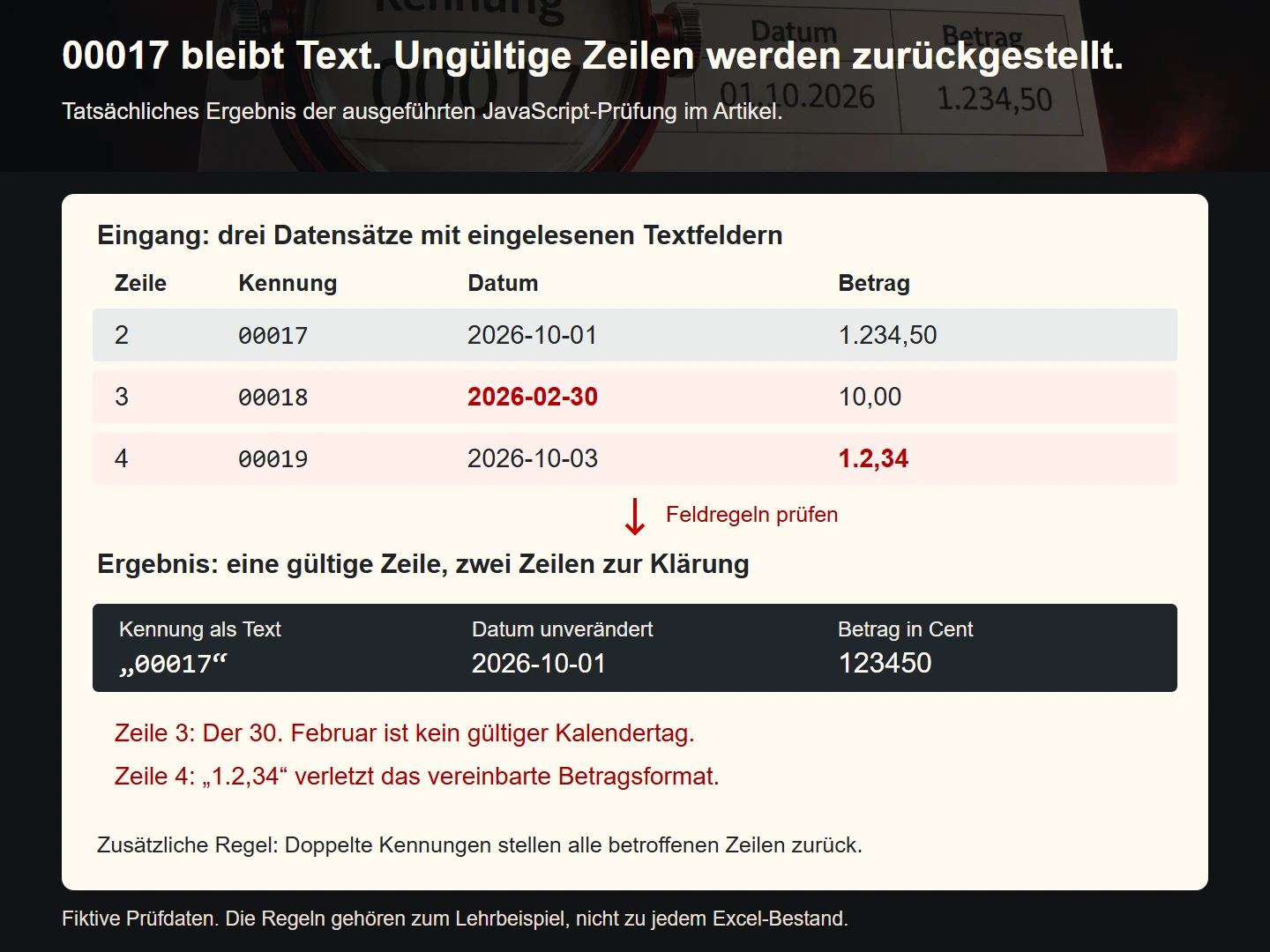
The first data row produces 123450 cents and keeps the identifier “00017”. The second is held back because February does not contain that date. The third has invalid grouping in its amount. Reported row numbers begin at two because this example assumes a header row in the incoming material.
When an identifier occurs more than once, the function marks every affected row. It does not secretly select a winner. Original records remain available for investigation. This too is a defined teaching rule rather than a universal policy for every dataset in which identifiers may repeat legitimately.
8. Separate checking from committing data
A validation report should initially leave production data unchanged. Show valid, uncertain and rejected records with their reasons. A separate commit follows business review. This gives a person the opportunity to inspect consequences before an incorrect assignment affects further transactions or customer-facing results.
Pass only unambiguously checked fields to the next stage. Our example produces no partially normalised record when an error occurs. This prevents a downstream process from accidentally combining a usable amount with an unusable identifier. A real application additionally needs appropriate permissions, traceable records and handling of concurrent changes at this boundary.
Totals remain an additional check. Compare record counts, permitted identifiers and a business-appropriate sum between source and imported data. Matching totals alone do not prove correct assignment. Two records can be exchanged between customers without changing the aggregate, while still producing incorrect results for both customers.
Record which file and rules were used. The reviewed version must be distinguishable from a later corrected input. Otherwise an earlier approval might accidentally be applied to changed content. A simple understandable version register may be enough for a small business, provided it is actually maintained and used.
9. Treat interchange files as a separate use case
A file for people and a file for automated import can have different requirements. A spreadsheet-oriented export needs understandable columns and appropriate types. A technical transfer needs an explicit schema. State the intended recipient and the processing that is supposed to happen after the file leaves the application.
Untrusted CSV cell content can be interpreted as formulas. The OWASP explanation of CSV Injection discusses this relationship and the limitations of general mitigation recipes. Our JavaScript example therefore generates no CSV export and claims no universal protection. An actual export needs verification of the target program, encoding and reopening behaviour.
Strict validation of these three example fields does not automatically secure other columns. A free-text comment can contain very different information from a five-digit identifier. Handle each field according to its meaning. Silently altering arbitrary data and losing information required by the next process is not a sound general solution.
Test the round trip with a small file. Do leading zeros survive, are dates interpreted correctly and do text values remain unchanged? A successfully saved file may be treated differently when reopened. The intended interchange route supplies the relevant evidence, rather than a filename extension that merely looks correct.
10. Decide what can remain in Excel
A manageable analysis with clear ownership can continue to work well in a workbook. Better structure, documented formulas and controlled inputs can make a substantial difference. Complete redevelopment might introduce more training and maintenance without improving the actual task. The aim is a dependable workflow, not replacement for its own sake.
Other needs can justify an addition or a move. Examples include binding concurrent edits, differentiated approval or several connected business transactions. Describe the actual obstacle instead of deciding from row counts alone. A small list can have more demanding business rules than a large read-only report.
A bounded intermediate approach is often testable: a controlled import feeds a defined record set while Excel retains a familiar report. State which system is authoritative for each item of information. Without that assignment, a helpful extension can become just another unclear copy of the business data.
Assess existing capabilities too. Who can change rules, examine queries and investigate an error? A technically elegant approach is of little practical use if nobody can operate or support it. The right next step connects improved data quality with an understandable owner for future changes.
11. Introduce the change in small steps
Begin with one bounded workflow, such as a recurring order-list import. Record inputs, expected results and the return path. After the trial, choose the next step from the findings. This establishes a verifiable improvement before every workbook is changed at once, reducing the number of simultaneous unknowns.
Compare old and new results using the same cases. A difference may mean a corrected old calculation, a new mistake or a changed definition. Investigate the cause. A new value is not automatically better simply because a new tool produced it, nor is an old result automatically the correct reference.
Give participants brief operating instructions: which file is authoritative, how is new information entered and who handles unclear cases? Remove confusing working copies only after verified transfer. Keep backups separately. An understandable introduction is part of the solution rather than a secondary topic to address after launch.
Checklist for improving an existing workbook
- Understand the business transaction and actual users.
- Preserve unchanged source files and their dependencies.
- Identify the authoritative record and responsible person.
- Describe important fields, missing values and uniqueness.
- Distinguish input, calculations and output clearly.
- Verify formulas with known normal and exceptional cases.
- Review automatic type changes during import deliberately.
- Hold invalid and duplicated records for investigation.
- Separate validation from writing imported data.
- Test the intended interchange route, including reopening.
- Document introduction, rollback and future maintenance.
Common questions about an existing Excel solution
Does every evolved workbook need replacing?
No. Examine the task and its specific weaknesses. Better structure and controlled inputs may be sufficient. An extension or move is justified when essential needs cannot reasonably be met that way, rather than because the workbook has reached an arbitrary age.
Why is a display format insufficient for identifiers?
A format can make the number 17 look like “00017”. It does not prove that the original source contained that exact sequence. Identifiers with meaningful characters therefore require a deliberately assigned text type and a verified interchange route.
May an importer correct unclear values automatically?
Only when an unambiguous business rule has been defined for the correction. A plausible guess must not quietly become an authoritative record. This example therefore holds invalid values with reasons rather than replacing them silently or selecting one duplicated row as the winner.
What is a useful first step?
Back up the current state and describe one complete transaction using a few representative rows. Then clarify one important field and its entire path from entry to output. This provides a reviewable basis for further improvement instead of changing many unrelated parts at once.
Sources and next steps
Sources checked on 9 November 2026. The workflow, sample records and JavaScript are original teaching examples. Interface names and availability can vary by Excel edition and environment; verify the version actually in use.