Security foundations for small business websites
A dependable foundation for manageable business websites, with a bounded PHP example and specific evidence of what was checked.

Even a modest business website contains several things worth protecting: published content, contact enquiries, administration accounts, the domain and technical configuration. An incident can interrupt availability or publish misleading information. A useful response is a manageable operating plan with named responsibilities and checks whose scope can be explained.
This guide uses a fictional trade business with service pages, a journal and a contact form. Its team publishes content through protected administration. The article develops a practical workflow and includes an executable PHP example for one narrowly defined output task. It does not assess the security state of any particular customer system.
1. Know the system you operate
Start an inventory with the components actually used: hosting, domain management, application, runtime, database, extensions and delivery services. Record an owner, access route and maintenance process for each. The purpose is not to collect the largest possible technical catalogue. It is to establish who can update an affected component or reach the responsible service during an incident.
For the fictional business, also identify public information and content restricted to administration. A contact enquiry does not automatically belong in the same public media directory as a cover image. Make those boundaries explicit. Otherwise a file can be treated as private in everyday conversation while remaining technically reachable through the website.
Include external dependencies too. An agency may maintain the application while another provider manages the domain. Resolve missing access before an urgent situation arises. Depending on one person's memory creates an organizational weakness. Store the necessary operating information with suitable protection and make it discoverable by the responsible roles.
2. Prioritize risks by their consequences
A small website does not benefit from an opaque catalogue disconnected from the business. First describe plausible consequences: the site becomes unavailable, an administration account is misused or enquiries are lost. Then examine existing safeguards and remaining gaps. This establishes a reasoned order for work rather than treating every possible task as equally urgent.
| Situation | Initial foundation | Reviewable evidence |
|---|---|---|
| Unauthorized administration | Strong authentication and limited rights | Separate test accounts with defined roles |
| A faulty update | A test environment and return route | A recorded comparison before release |
| Content loss | Separate backup storage | A completed recovery exercise |
| Unexpected input | Server checks and appropriate output | Targeted tests of that processing |
This is a working model rather than a complete risk assessment. Customer accounts or sensitive documents require additional consideration. The scope follows the information and functions actually present. A new module may change the initial assessment, so revisit the inventory when adding meaningful capabilities.
3. Assign ownership for updates
Maintained software requires a concrete route for acting on updates. Who receives notices, checks the affected version and arranges implementation? Name a responsible role for each component. Automatically installed updates still require observation and a way to handle failure. Automation changes the work involved rather than removing operational responsibility.
Before a relevant update, consider changes, project-specific adaptations and the route back. Review authentication, content presentation and form handling in an appropriate test environment. Avoid uncontrolled copies of confidential production data. Record the version actually released afterwards. Downloading a package does not establish that the running application has been updated.
A known urgent vulnerability should not automatically wait for a general monthly schedule. The responsible specialist evaluates exposure, available safeguards and required action. A recurring appointment remains useful for ordinary maintenance. Distinguish planned upkeep from a specific situation that needs faster attention rather than applying the same calendar to every circumstance.
4. Protect administration as a distinct task
Give responsible people individual accounts rather than one shared login. This supports appropriate permissions and understandable attribution of changes. Disable accounts no longer required. Include former providers, test accounts and recovery routes in the review. A strong password cannot compensate for an overlooked alternative route into the same system.
Where supported, add suitable authentication protection. The choice depends on the application and available mechanisms. Plan account recovery after device loss as well. Do not keep unprotected emergency access information in publicly distributed project files. OWASP's authentication guidance provides technical context for these related responsibilities.
Handle failed sign-in attempts appropriately. The system should not simply accept an unlimited rapid sequence of guesses. At the same time, poorly designed lockout behaviour can disrupt legitimate work. Implement this within the application's responsible authentication mechanism. A visible security badge does not substitute for actual handling of requests.
5. Separate identity from permission
Authentication establishes which account is being used. Authorization determines which action that account may perform. In the example, an editor can change an article but cannot create administrators. Implement that distinction for every protected function rather than expressing it only through the navigation menu.
A hidden administration link is not access control. The corresponding server route must check permission itself. Directly requesting an address must not reveal another person's information or allow unauthorized changes. Use separate test roles for review and write down the actions each should be allowed or denied before running the checks.
Revisit the role model when extending the application. An export module may expose more information than an existing content view. Granting everyone administration privileges for convenience would conceal those differences. Assign the rights needed for the actual task and record who is responsible for approving unusual access.
6. Separate internal storage from public files
Publicly served files and internal configuration need different storage boundaries. Credentials, backups and logs do not belong in a directory the web server distributes generally. An obscure file extension is not an adequate substitute. What matters is actual reachability under the rules of the specific deployment.
Review that boundary using harmless test files and the intended server configuration. This does not involve inspecting third-party systems. Check error presentation too: visitor-facing responses should not reveal credentials or internal file contents. Useful diagnostics belong in the protected operating records designed for that purpose.
Consider version control and publication separately. A private project may contain example configuration but should not accidentally include live secrets. If a key becomes exposed, removing it from a visible file may be insufficient. Assess the incident and replace affected access through its real management process rather than assuming deletion resolves every copy.
7. Validate input on the server for its purpose
A browser form provides useful assistance, but it is not the only possible source of a request. The server handles every incoming value against defined rules. Check expected type, length and business purpose. A field expected to contain text should not silently accept an unexpected nested data structure.
Rules should fit the service. An appointment date needs different treatment from a message. Names should not be rejected merely because they do not match a narrow idea of ordinary spelling. Choose technical limits deliberately and explain them clearly. One generic character-cleaning routine is not a suitable answer for every kind of input.
Uploads require separate consideration. Ask whether the capability is necessary first, then define purpose, size, type checks, storage and access. This guide does not supply a complete upload endpoint. Adding a file field changes both the business task and its technical responsibilities, so review it as an extension rather than a cosmetic control.
8. Prepare output for its actual context
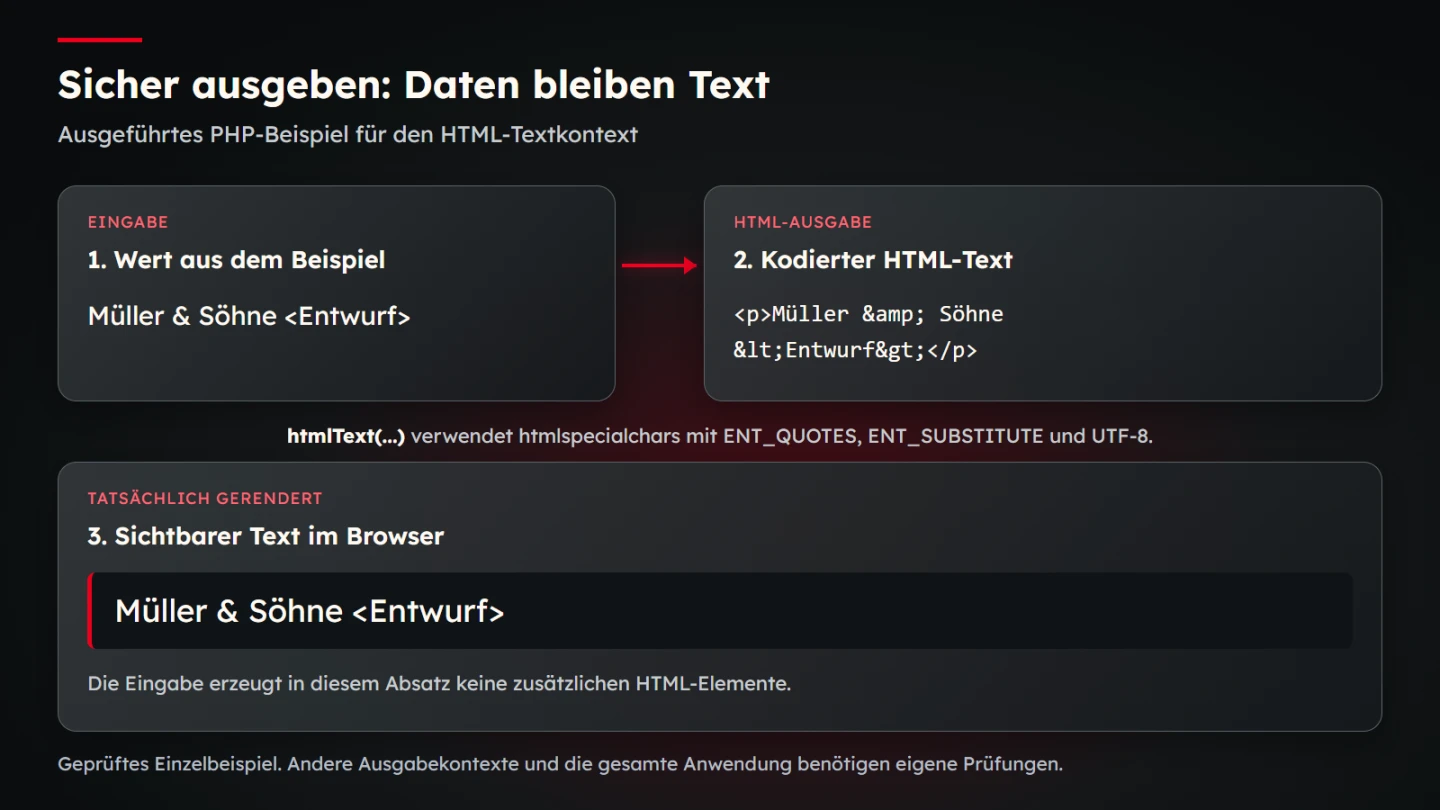
The following PHP function is intended for text placed inside an HTML element. It converts relevant special characters into their HTML representation. The value remains readable without being interpreted as markup. This is not a general sanitizer for JavaScript, CSS, database queries or arbitrary link destinations.
<?php
declare(strict_types=1);

function htmlText(string $value): string
{
    return htmlspecialchars(
        $value,
        ENT_QUOTES | ENT_SUBSTITUTE,
        'UTF-8'
    );
}

$projectName = 'Müller & Söhne <Entwurf>';
echo '<p>' . htmlText($projectName) . '</p>';
The ampersand and angle brackets appear as part of the text. They are encoded appropriately for output. The explicit character set identifies the expected processing. PHP's manual explains the function and its options. The learning example is tested with special characters, quotation marks, Unicode and an incomplete UTF-8 sequence.
OWASP's cross-site-scripting guidance distinguishes output contexts. That distinction matters: the same value can require different handling in a paragraph and in executable code. Use established template mechanisms for the appropriate purpose. A collection of improvised character replacements without context does not provide a dependable universal protection layer.
9. Keep database values separate from query structure
When input contributes values to a database query, use the parameter mechanism provided by the database interface. Do not create query structure by directly concatenating uncontrolled values. OWASP and the PHP manual explain this principle through prepared statements and related approaches.
Parameters do not replace permission checks. A correctly parameterized query can still return information an account should not see. Identifiers such as freely selected column names also cannot simply be treated like arbitrary data values. Where a choice is necessary, build it from an explicitly allowed set rather than accepting any submitted name.
For this business, a public article route reads only released content. An administration view additionally checks the authenticated role. Test those rules against actual data access. Saying that a particular library is used does not establish that every query and authorization decision has been implemented correctly.
10. Review HTTPS and sessions in context
An encrypted connection protects transport between the relevant endpoints. It is a foundation for confidential sign-in, not proof of safe application behaviour. A harmful public file can still be delivered over encryption. Separate transport, access and content processing in the operating review so one successful check does not conceal an unrelated weakness.
Evaluate session settings against the actual deployment. Redirects, upstream infrastructure and cookie properties need to work together. Copying isolated headers does not replace reviewing the complete sequence. Examine which views remain reachable after sign-in, sign-out and a permission change rather than checking only the first successful login.
Include caching in that review. Private administration should not accidentally be treated like general public content. The application owns its specific caching and session strategy. Test public and authenticated states separately so a successful page request under an administrator account is not mistakenly recorded as a public-access result.
11. Judge backups through recovery
A backup becomes practically useful when it can support restoration. Consider files, database and necessary configuration together. A copy in the same publicly reachable directory does not establish a dependable independent return route. Protect access to backup material according to its contents and role.
Exercise restoration in a suitable separate environment. Check whether content, images and required settings fit together. Do not resend genuine enquiries unintentionally. A successful exercise demonstrates the process under its documented conditions; it is not a general promise of an arbitrary recovery time for every incident.
The business decides what loss and interruption it can tolerate. Those decisions inform backup frequency and recovery arrangements. Do not import them blindly from a generic industry example. Record responsibility, access and the last reviewed restoration process in operating documentation available to the people who would need it.
12. Make incidents recognizable and manageable
A small business needs a clear contact route for technical concerns. Who is informed about unexpected content changes, outages or suspicious administration access? Who can suspend an account or stop publication? Resolve those responsibilities in advance rather than searching for them under pressure.
Logs should make relevant events understandable without collecting unnecessary confidential content. Assign responsibility for their scope and retention within the actual system. A quantity of log files is not itself monitoring. Establish which notices someone receives and what action follows them.
During an incident, separate observations from assumptions. Uncontrolled deletion can obstruct investigation. Restoring an old backup without checking the cause may reintroduce the same problem. A responsible specialist coordinates containment, examination and return to operation. Assess applicable reporting or notification duties for the specific incident rather than relying on a general website checklist.
13. Run a manageable acceptance review
- Actual components and responsible roles have been recorded.
- Administration accounts match individual tasks.
- Protected server routes check the required permission.
- Configuration and backups are outside public storage.
- Forms receive defined server-side processing.
- Output handling matches each context.
- Database values remain separate from query structure.
- Public and private states have been reviewed separately.
- A restoration exercise has actually been completed.
- Contacts and initial incident steps are known.
State the limits of acceptance. Testing the output function does not automatically test the administration system. A controlled restore does not establish correct user permissions. Keeping these responsibilities separate helps identify what remains to be done. Treat security as a reviewable operating task rather than a broad promise on a sales sheet.
14. Continue maintenance after changes
Apply the same questions to new capabilities. A newsletter, customer area or import changes the previous scope. Clarify access, processing, backup and failure states before release. A small new item in the navigation can introduce several technical responsibilities beyond its visible size.
A provider change also deserves review. Transfer access, keys, operating knowledge and recovery records deliberately. Remove rights that are no longer needed. Confirm the actual state after handover. This keeps the website maintainable without relying on the memory of one person who may no longer be available.
A useful foundation remains small enough to use repeatedly. It identifies real systems, responsible roles and tested processes. The fictional trade business gains a dependable capacity to prevent problems, notice concerns and recover from failure. That capacity should grow with the website rather than being treated as a one-time launch feature.
15. Keep evidence specific and repeatable
For each check, record the question, environment and expected result. An editor-role test might confirm that a protected administrator function rejects the request. A backup exercise might confirm that a defined content set and its images return correctly. These are different statements and should not be merged into a general passed-security label.
Retain harmless test inputs and controlled scenarios so later maintainers can repeat the review. Do not fill test records with live passwords or confidential enquiries. When an implementation changes, revisit the affected evidence and the dependent workflow. A new template engine may change output handling; a new host may change file exposure or restoration steps.
Finally, explain unresolved issues in language the responsible business owner can act on. Identify the affected function, consequence and next decision. Avoid both unsupported reassurance and an unprioritized list of alarming possibilities. A clear operating record helps technical and business teams agree what must happen next and who will confirm it.
Sources and scope
Sources checked on 9 November 2026. These primary references were reviewed for the technical foundations described above. The operating scenario, prioritization and checklist are original editorial working tools.