Structuring a small PHP application clearly
Three manageable files make responsibilities visible. A guide to clear boundaries, appropriate text output and traceable changes.

A PHP application can begin with one file. While it produces only a small amount of fixed content, that may be easy to follow. Problems arise when routing, database access, validation, email delivery and HTML become intertwined. A small change can then affect several workflows unintentionally.
This guide builds a bounded example with two public information pages. It needs neither a database nor an additional library. It is a learning foundation, not a complete production system. Its purpose is to make responsibilities visible and examine the practical consequences of small architecture decisions.
1. Organise responsibilities rather than fashionable labels
A useful structure answers simple questions. Where is an address interpreted? Where is the business decision made? Where is HTML generated? Which files may a browser request at all? If answering those questions requires reading one very large file, a targeted separation can help.
Folder names matter less than their meaning. A directory called “Services” does not automatically create good design. Its responsibilities and permitted dependencies should be understandable. Equally, a small project does not immediately need an extensive layered architecture.
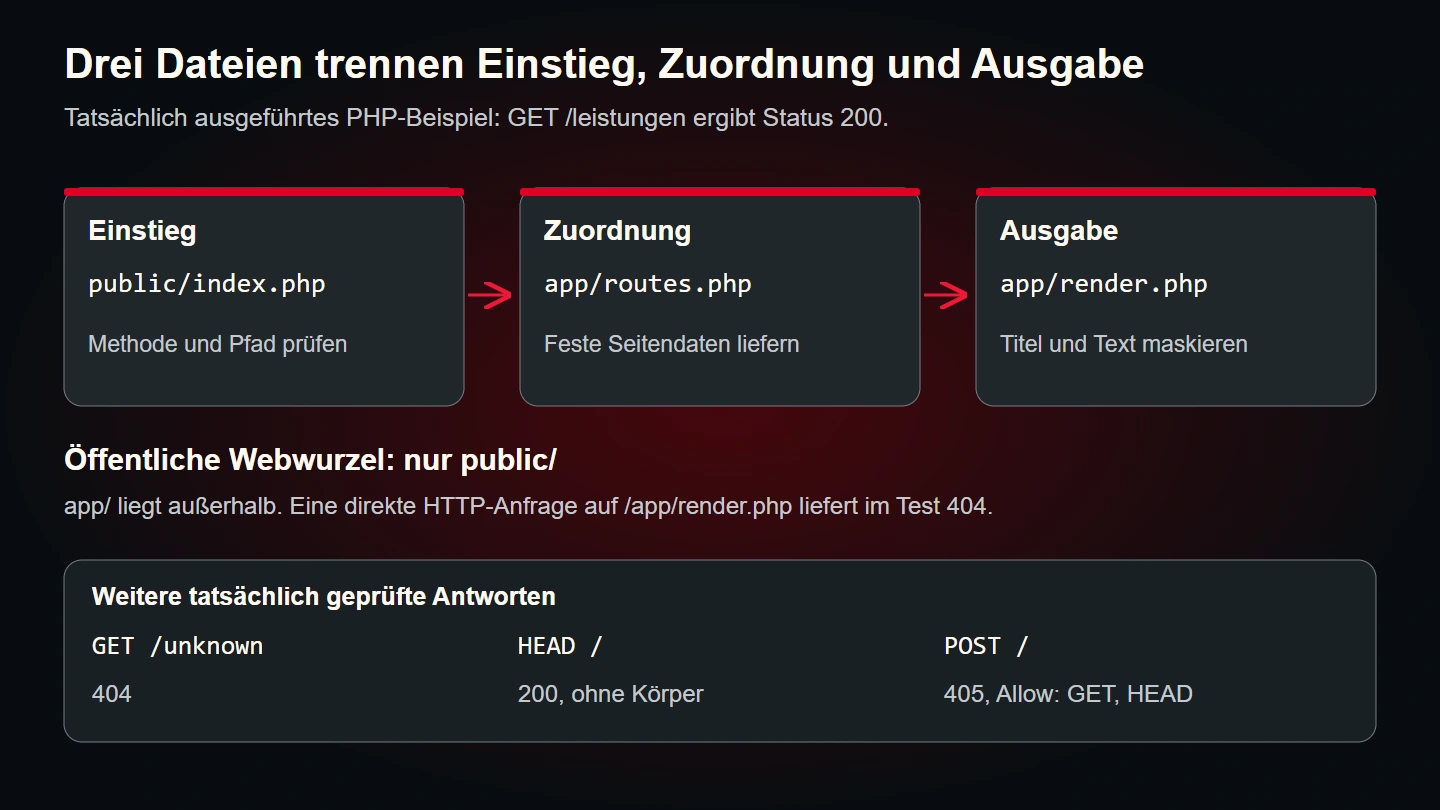
Our example needs a public entry point and two internal files. One maps known addresses to information. The other renders a small HTML page. Request handling remains separate from presentation without hiding a simple task behind numerous abstractions.
| Responsibility | Example location | Deliberately excluded |
|---|---|---|
| Receive a request | public/index.php | Business database decisions |
| Determine the destination | app/routes.php | Loading arbitrary files from URL values |
| Present a response | app/render.php | Hidden business actions |
| Keep development evidence | tests and project documentation | Public delivery of internal data |
2. Deliberately limit the public document root
The web server should publish only the directory containing files intended for public access. Our example uses public. Internal PHP code sits beside it in app. Naming a file “private-config.php” does not protect it by itself.
project/
├── app/
│   ├── render.php
│   └── routes.php
├── public/
│   └── index.php
└── tests/
The boundary must match actual hosting configuration. If the server publishes the whole project directory instead, the intended separation has not been implemented. After setup, check whether an internal file is accessible through a direct address. Its source must not be publicly returned.
Backups, logs and credentials should not be stored as ordinary public files either. This is an operational as well as technical responsibility. A later copying script must not publish the whole working directory accidentally. Define the permitted release contents explicitly.
3. Give rendering a small, explicit input
The file app/render.php receives two strings and creates a complete HTML document. Both values are escaped for their HTML text context. It does not accept arbitrary HTML blocks. This keeps its boundary straightforward.
<?php
declare(strict_types=1);

function renderPage(string $title, string $intro): string
{
    $escape = static fn(string $value): string => htmlspecialchars(
        $value,
        ENT_QUOTES | ENT_SUBSTITUTE,
        'UTF-8'
    );

    return '<!doctype html><html lang="en"><head>'
        . '<meta charset="utf-8">'
        . '<meta name="viewport" content="width=device-width, initial-scale=1">'
        . '<title>' . $escape($title) . '</title>'
        . '</head><body><main>'
        . '<h1>' . $escape($title) . '</h1>'
        . '<p>' . $escape($intro) . '</p>'
        . '</main></body></html>';
}
The official htmlspecialchars documentation describes conversion of special characters. The function is not a universal protection for every output context. JavaScript, URLs and other contexts may need different treatment. This example deliberately limits the task to ordinary HTML text.
Larger views may be easier to maintain in template files than in long concatenated strings. The responsibility remains the same: a template receives named data and does not trigger concealed business actions. Whether a template engine is useful depends on the project's actual scope and existing foundation.
4. Map known addresses to defined results
The second internal file maps a known address to a small result structure. Unknown addresses produce a genuine not-found status. It does not construct a filename from the URL. The transition from a public request to internal code therefore remains bounded.
<?php
declare(strict_types=1);

function resolvePage(string $path): array
{
    return match ($path) {
        '/' => [
            'status' => 200,
            'title' => 'A clear starting point',
            'intro' => 'This learning page explains a small PHP structure.'
        ],
        '/services' => [
            'status' => 200,
            'title' => 'Services overview',
            'intro' => 'This page contains fixed example information only.'
        ],
        default => [
            'status' => 404,
            'title' => 'Page not found',
            'intro' => 'The requested address is not available.'
        ]
    };
}
This arrangement is sufficient for the small demonstration. A larger application may use a router and controllers instead. Controlled mapping is the important property. An unchecked request value should not determine which internal PHP file is included through path concatenation.
The result has a status, title and introduction. Extend that agreement deliberately when requirements grow. If individual routes suddenly depend on concealed additional keys, the interface should make that change explicit. Otherwise the original confusion has merely moved elsewhere.
5. Keep the public entry point short
The few steps meet in public/index.php. Fixed source-defined paths load internal files. The method is then checked, the path identified and a response created. Content is emitted only after the status and content type have been determined.
<?php
declare(strict_types=1);

require_once dirname(__DIR__) . '/app/render.php';
require_once dirname(__DIR__) . '/app/routes.php';

$method = $_SERVER['REQUEST_METHOD'] ?? 'GET';
header('Content-Type: text/html; charset=UTF-8');

if (!in_array($method, ['GET', 'HEAD'], true)) {
    header('Allow: GET, HEAD');
    http_response_code(405);
    echo renderPage('Method not allowed', 'This learning page is read-only.');
    exit;
}

$path = parse_url($_SERVER['REQUEST_URI'] ?? '/', PHP_URL_PATH);
if (!is_string($path)) {
    http_response_code(400);
    if ($method !== 'HEAD') echo renderPage('Invalid request', 'The address is invalid.');
    exit;
}

$page = resolvePage($path);
http_response_code($page['status']);
if ($method !== 'HEAD') echo renderPage($page['title'], $page['intro']);
require_once avoids including a required file again when it has already been loaded. The loading path is explicit in this demonstration. A larger project may use autoloading, but still needs to separate internal paths from uncontrolled request values.
The code processes no forms. A later write operation needs additional rules such as authentication, authorisation and protection against unwanted actions. Offered methods are deliberately limited to reading. Merely changing GET to POST does not implement a secure business process.
6. Distinguish configuration from business data
Configuration describes how an application operates. It may contain database connection information, delivery settings and permitted public addresses. Business data includes items such as customer orders or course offers. These categories need different maintenance and should not become mixed accidentally.
No secret configuration is needed for this demonstration. A real project should choose its location deliberately. Credentials do not belong in public JavaScript or portable example packages. Detailed error output must not expose them inadvertently either.
Different environments should obtain their settings explicitly. Development might write messages to files while production uses real delivery. Copying a configuration must not overwrite those differences without review. Releases and restoration procedures need particular care here.
Document required setting names and meanings without including secret values. A new maintainer should know what is needed and who owns it. Example configuration can use placeholders, but should not invent supposedly real credentials. Missing required settings should be detected in a controlled way.
7. Keep business rules out of rendering
When data is added, it is tempting to query and make decisions directly inside HTML templates. Small formatting decisions belong there. Whether an order may be accepted or a payment initiated needs its own business responsibility.
A useful intermediate design can remain simple: a function receives validated input and returns a result. Rendering then decides how to present it. The same rule can later be used by a background job or endpoint without recreating HTML.
Avoid excessive decomposition at the same time. A class containing a meaningless pass-through call does not automatically create clarity. Each extra boundary should make a specific change or check easier. If nobody can explain its purpose, simplification may help.
During review, ask whether a presentation change could alter a business decision. If so, responsibilities may be mixed. Conversely, introducing a business rule should not require updating the same condition differently in several templates and endpoints.
8. Include failure states in the structure
An unknown address is expected and receives 404 in this example. An unsupported method receives 405. A failed database connection would be an operational failure instead. The distinction belongs in both the technical response and understandable feedback.
Do not expose internal details indiscriminately. Visitors need an accurate description of a failed action, but not credentials or full file paths. Information needed for diagnosis should be recorded through the intended logging mechanism and protected appropriately.
The example deliberately does not implement a comprehensive error-handling framework. An application with external services must determine where failures are caught, logged and translated into responses. A central boundary may help, but must not hide important differences behind a generic success message.
After a failed write operation, determine whether anything was partially saved. Transactions or idempotent processing may then be necessary. Reliable business behaviour does not emerge from a new folder structure alone. The structure should make it easier to implement and verify explicitly.
9. Check the example under appropriate conditions
Save the three files according to the shown tree. For a controlled development check, use PHP's built-in server. From the project directory, run php -S 127.0.0.1:8080 -t public public/index.php. The final path routes requests through the shared entry point in this example.
The official built-in server documentation describes a development tool. This is not a recommendation for public production hosting. Configure and verify the actual web server used by the target environment separately.
| Check | Expected result | Why it matters |
|---|---|---|
| GET / | 200 with a main heading | The known root works |
| GET /services | 200 with the services heading | Routing and rendering agree |
| GET /unknown | 404 | The error page does not claim success |
| HEAD / | 200 without a response body | The method is handled deliberately |
| POST / | 405 | An unsupported action is refused |
| Direct access to an internal file | No public source disclosure | The document root is genuinely limited |
Do not inspect visible wording alone. A polished error page with status 200 changes the meaning of the response. A successful syntax check also does not prove the address works on the real host. Different checks answer different questions and complement one another.
10. Make changes and releases traceable
Each change should identify affected files and data. A small feature request must not quietly replace a whole configuration. Before release, review the current state, backup and rollback route. Afterwards, test the actual visitor journey again.
Version control helps identify differences, but does not replace a backup of changing data or verification of the destination. Database changes require particular attention to new inputs received meanwhile. An old complete backup must not overwrite those records without examination.
Separate reusable technical capabilities from project-specific content. A common defect can then be fixed in a shared foundation deliberately. Another customer's design and business data should not be copied as an incidental part of that process. Clear boundaries make the distinction easier to maintain.
11. Keep dependencies understandable
The entry point knows the routing and rendering functions. Rendering knows neither the current request nor the route table. That direction matters: rendering can be checked with suitable strings without recreating an HTTP request.
If a template reads global request values itself, that dependency is concealed from its function call. A test might appear to supply two strings while additional environment values influence the result. Hidden inputs make diagnosis and reuse harder.
This does not mean every dependency immediately needs a dedicated interface. A clear argument may be enough for a fixed small function. An external delivery service or storage operation may benefit from a replaceable interface because failure cases can be checked without real delivery. Extra structure then has a specific purpose.
For an established project, sketch its dependencies. Which files load which others? Where are connections opened? Which function actually sends a message? The exercise often reveals that an apparent formatting helper unexpectedly initiates a business process. Resolve that ambiguity before broader reuse.
12. Refactor an existing application in small steps
An existing application does not automatically need a complete rewrite. Start with a bounded workflow and record its current behaviour, including successful inputs, typical failures and generated responses. Without that baseline, a cleaner structure can change important business properties unnoticed.
A first step might move one page's rendering into a function with clear inputs. Repeat the same request afterwards. Only continue to the next responsibility when that step works. This keeps changes reviewable and makes regressions easier to connect to a particular decision.
Watch global variables and files with side effects. An included file may define functions and immediately change data. Understand whether that effect is intended before separating it. Another require call must not accidentally resend a message or create a duplicate order.
Record assumptions retained at each new boundary. A database connection may remain shared temporarily or a legacy template may expect a particular variable. Internal documentation can explain those transitions. They do not need technical work-in-progress notices in the public interface.
Remove the unused former path in a controlled way after verification. Two maintained implementations of the same task often make the next change harder. Keep rollback material in backups and history rather than as an accidentally reachable second application inside the public directory.
13. Test output with significant characters
A useful rendering check uses characters with special HTML meaning. Pass a title such as <Example & review>. It should remain visible as text rather than becoming a new HTML element.
Inspect both output locations: the document title and main heading. Correct escaping in one place does not prove the other. A shared helper reduces repetition, but its use still needs checking. A directly concatenated variable could bypass the agreement.
This check is deliberately narrow. It verifies text rendering in this example, not overall security. Added attributes, links or script data need appropriate rules and cases of their own. Reliable structure keeps those distinctions visible rather than relying on one ambiguous helper supposedly making every value safe everywhere.
Keep a small record of the runtime and test conditions with these examples. A successful result on one development machine does not establish every possible hosting configuration. At deployment, check the configured document root and response behaviour again. That turns an architectural intention into evidence about the environment actually serving visitors.
14. A small PHP foundation checklist
- Public entry points and internal files are clearly separated.
- The actual document root enforces that boundary.
- Addresses map to controlled, known destinations.
- Rendering receives explicitly named data.
- Escaping fits the output context.
- Configuration and secret values are managed appropriately.
- Business rules are not scattered invisibly across templates.
- Expected states and operational failures are distinguished.
- Status codes and complete workflows have been checked.
- Release and rollback preserve existing content and data.
Common questions
Does every project need a framework?
No. A framework may suit larger scope, existing team experience or specific requirements. Choose according to the task and long-term maintenance.
How many files are correct?
There is no fixed count. Each boundary should express a meaningful responsibility and simplify changes or checks. Many tiny files can be as confusing as one large file.
Is this example sufficient for a production customer portal?
No. It lacks authentication, permissions and business capabilities, among other requirements. It explains a bounded read-only structure.
Sources and related reading
The linked official PHP manual pages explain file inclusion, HTML escaping and the development server. Sources checked on 9 November 2026. The directory structure and code are original learning examples.
Rendering should build on an understandable document: Semantic HTML through a complete example page. For planning the actual offer, read What a professional business website needs to achieve.