Analyse CSS animations and improve them deliberately
Keep a concrete movement task unchanged and inspect what its animated property actually changes.

A CSS animation cannot be assessed from an attractive final image alone. The important questions are which property changes, how movement starts and what work the browser performs along the way. Two markers can travel the same visible distance while reporting different layout positions. Understanding that distinction supports a more focused improvement than simply shortening a duration or adding speculative optimisation hints everywhere.
This guide compares two deliberately small animations. Both move a red marker 180 CSS pixels to the right once and finish after 600 milliseconds. One changes left and the other changes transform. The complete German and English examples were actually executed in Edge. A total of 101 passing conditions cover automatic starts, endpoints, geometry, keyboard access and a controlled diagnostic. No frame rate, device capability or field measurement was invented.
Define a specific movement task first
The movement has a precise, purely illustrative purpose: a small marker travels along a track. Text explains the distinction independently of the moving object. There is no changing inventory, hidden form state or essential message that appears only in a fleeting intermediate frame. Both variants can therefore be compared against the same geometric expectation without confusing motion with a business operation.
The marker is 32 pixels wide. Its travel distance is 180 pixels. Duration, linear timing and iteration count are identical. These constants make the comparison inspectable. If one marker also became larger while another slowed down or changed transparency, an observed difference could no longer be attributed cleanly to the property under investigation. A useful diagnosis changes its relevant cause as narrowly as possible.
The two tracks appear beside each other on a broad viewport and stack on a narrow one. Their content remains the same. This is not a competition between commercial products or a general ranking of browsers. It investigates a particular implementation choice within a controlled document, with enough fixed conditions to explain the observed geometry.
Understand the property being animated
The first marker is absolutely positioned and changes its left offset. Its observed offsetLeft increases accordingly. The second retains its original layout offset while a transformation translates its visual representation. Its rectangle also appears further right even though its layout offset stays unchanged. These readings describe different aspects of the same visible box rather than contradicting each other.
The MDN transform reference explains transformations and related effects, including stacking contexts. This does not mean that every transformation is free in every application. The affected surface, other visual effects and the surrounding rendering workload still matter. A transformed element can remain part of an expensive overall page.
A transformation is a useful starting point for a purely visual translation. If the actual layout needs to change, a visual offset alone may instead be functionally wrong. An expanding area whose following content genuinely needs additional space is a different task. Establish the intended effect before selecting the property rather than treating one implementation technique as universally correct.
Specify the complete timing contract
The animation shorthand explicitly sets its name, duration, linear timing function, delay, iteration count and fill behaviour. Delay is zero. Both animations start automatically and run once. There is no separate playback button or artificial waiting phase before movement. The selected fill behaviour keeps the final value visible after the active interval ends.
The MDN animation reference describes the shorthand's components. In an established project, check which longhand values a new shorthand also sets. An apparently small addition could otherwise overwrite an existing duration, direction or fill mode. Giving each movement task a clear owner and class makes those interactions easier to inspect.
A single iteration differs from a continuously running loop. After completion, the marker has no continuing active animation interval. That does not mean every consequence of its filled value disappears. The retained endpoint still participates in presentation. Long-lived components should account for that distinction instead of describing a finished animation as though it had been completely removed.
The complete example files
The HTML describes two sections and an independent link to the explanation. The marker tracks are decorative and hidden from assistive presentation, while headings and text explain their role. The CSS contains the common styling and both keyframe sequences. The example's actual movement requires no JavaScript module or script-triggered start.
example-en.html
<!doctype html>
<html lang="en">
<head>
 <meta charset="utf-8">
 <meta name="viewport" content="width=device-width, initial-scale=1">
 <title>Two paths for the same movement</title>
 <link rel="stylesheet" href="example.css">
</head>
<body>
 <main>
  <h1>Two paths for the same movement</h1>
  <p>The red markers immediately move 180 pixels to the right once and remain at their endpoint after 600 milliseconds.</p>
  <div class="examples">
   <section aria-labelledby="layout-title">
    <h2 id="layout-title">Layout position</h2>
    <div class="track" aria-hidden="true"><span class="marker layout"></span></div>
    <p>The left property changes the position of the absolutely positioned box.</p>
   </section>
   <section aria-labelledby="visual-title">
    <h2 id="visual-title">Visual translation</h2>
    <div class="track" aria-hidden="true"><span class="marker visual"></span></div>
    <p>Transform moves the visual representation without changing its original layout offset.</p>
   </section>
  </div>
  <p><a href="#erklaerung">Read the distinction</a></p>
  <h2 id="erklaerung" tabindex="-1">What this comparison covers</h2>
  <p>Distance, duration and marker size are equal. This presentation does not prove a frame rate or device performance.</p>
 </main>
</body>
</html>
example.css
:root { font: 100%/1.5 Arial, sans-serif; color-scheme: light; }
* { box-sizing: border-box; }
body { margin: 0; color: #192329; background: #fffaf3; }
main { width: min(100%, 56rem); margin: auto; padding: 1rem; }
.examples { display: grid; grid-template-columns: repeat(auto-fit, minmax(min(100%, 16rem), 1fr)); gap: 1.5rem; }
section { min-width: 0; padding: 1rem; border: 1px solid #73665e; }
h1, h2 { overflow-wrap: anywhere; }
.track { position: relative; height: 4.5rem; background: #ede2d6; }
.marker { position: absolute; top: 18px; left: 0; width: 32px; height: 32px; background: #b80024; }
.layout { animation: move-left 600ms linear 0s 1 forwards; }
.visual { animation: move-transform 600ms linear 0s 1 forwards; }
@keyframes move-left { from { left: 0; } to { left: 180px; } }
@keyframes move-transform { from { transform: translateX(0); } to { transform: translateX(180px); } }
a { color: #a60021; }
a:focus-visible { outline: 3px solid #192329; outline-offset: 4px; }
The other language edition uses the same structure with appropriately translated content. Both HTML files and the shared stylesheet were actually exercised. Reusing the example therefore requires the matching files. An existing rule for the same marker could override the left offset or transform and invalidate the conditions on which the comparison depends.
Read layout position and visual geometry separately
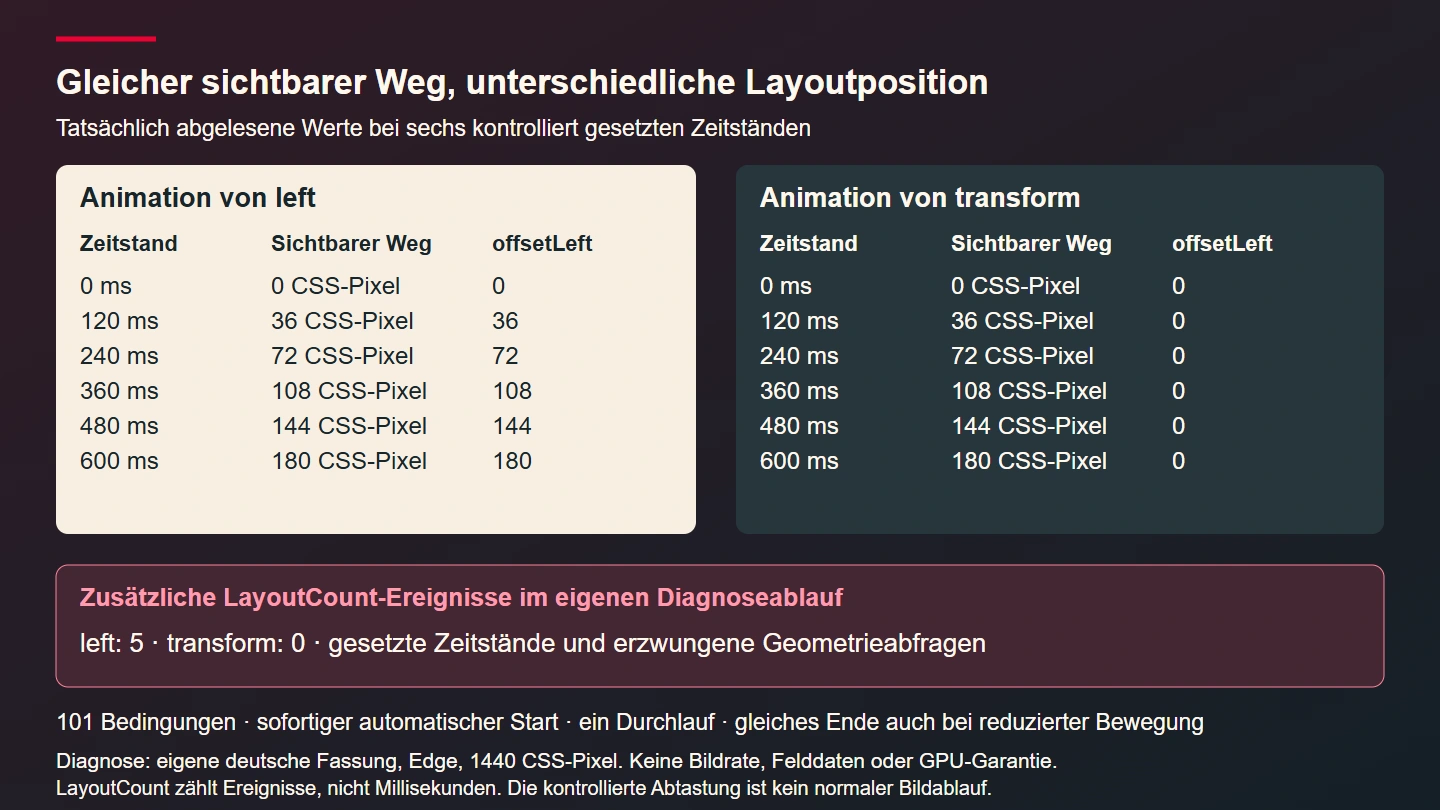
The controlled geometry check sets six times: zero, 120, 240, 360, 480 and 600 milliseconds. The actual readings for this linear motion are zero, 36, 72, 108, 144 and 180 pixels of visible travel. Both variants agree on that visible movement. The difference is their layout offset: the first changes it while the second keeps it at zero.
These intermediate times are deliberately assigned through the animation interface for diagnosis. That is a testing tool, not an additional pause control in the visitor example. Geometry reads then inspect the rectangles actually produced. The ordinary example still starts immediately and completes without this intervention. Controlled sampling must not be represented as a recording of normal screen frames per second.
| Assigned time | Visible travel in both variants | Layout offset for left | Layout offset for transform |
|---|---|---|---|
| 0 ms | 0 pixels | 0 | 0 |
| 120 ms | 36 pixels | 36 | 0 |
| 240 ms | 72 pixels | 72 | 0 |
| 360 ms | 108 pixels | 108 | 0 |
| 480 ms | 144 pixels | 144 | 0 |
| 600 ms | 180 pixels | 180 | 0 |
Measure browser work without overstating the result
A layout counter was also inspected through Chromium's diagnostic interface in the own German edition at 1440 pixels wide. The initial position is set and geometry read before capturing the starting counter. The six assigned times then follow with forced geometry reads. This executed procedure produces five additional layout events for the left variant and zero for the transform variant.
Those numbers count events; they are not milliseconds. They describe this controlled sequence with explicitly assigned times and forced reads. They cannot establish a smartphone frame rate or a percentage improvement for an entire site. Converting them into such a claim would manufacture a metric that was never collected. Here, the observation explains a difference in the kind of browser work.
The web.dev guide to high-performance animations explains why properties involving layout or painting deserve careful investigation. A real application should then be recorded while performing its actual task, including representative content, images and concurrent work. This small fixture isolates one mechanism and does not replace application-specific diagnosis.
Check starts and endpoints on fresh pages
Tests load both language editions at three widths and under two motion preferences. Startup is not merely inferred from the stylesheet. The checks observe zero delay, a 600-millisecond duration, one iteration and an already started time before completion. They then wait for the finished state and measure the actual visual endpoint of both markers.
The example also runs with the reduced-motion preference set. That is an explicitly observed decision for this particular short demonstration, not a complete accessibility assessment. Its motion is decorative and contains no essential transient information. Further requirements of a real service need to be evaluated against its content and usage context rather than declared satisfied by these selected checks.
An additional case disables JavaScript and verifies the same CSS endpoint at a narrow width with reduced motion. The demonstrated movement therefore does not depend on script startup. That is a particular resilience property of these files, not evidence that every animated application component will work without JavaScript. Dependencies must still be examined per component.
Keep movement separate from ordinary interaction
The independent link below the examples remains keyboard reachable. Every tested combination really uses Tab and checks that the link becomes the active element. Focus is not transferred to the moving decorative marker. Explanatory text remains in the document flow during and after movement, so understanding the comparison does not require tracking the box.
This separation is useful in real interfaces. An animated card should not automatically steal focus simply because it appears. An important message should likewise not be communicated solely by a brief movement. Additional state announcements depend on the function being performed. These decorative markers do not perform a business action and need no invented success message.
The tested 320, 390 and 1440 pixel viewports have no horizontal page overflow. That is a geometric observation for unchanged content. Longer text, a greater travel distance or an additional scale transformation needs renewed testing. The original bounds should not silently become a general promise that any future content will fit.
Avoid distributing speculative optimisation hints
The example leaves will-change at its computed default. It does not permanently promote every card in anticipation of a possible animation. The MDN will-change reference explains cautious use and the additional resource cost that hints can create. An optimisation declaration is not a general quality badge to copy into every base class.
If an actual application demonstrably benefits from preparation, that preparation needs a lifecycle. Which element should be prepared, when is preparation useful and when should the hint be removed? A growing collection of prepared surfaces can reverse the intended benefit. Determine scope from the observed problem rather than from the mere presence of animation.
A three-dimensional transform without a visible purpose is not a dependable shortcut to a faster page either. Hardware, browser decisions and surrounding rendering remain relevant. The simplest reasonable first change is often replacing an unnecessarily expensive property with one that matches the intended effect, then observing the same task again under comparable conditions.
Give each changing property a clear owner
A common failure arises when keyframes, a hover rule and a script all assign the same transform. The intended translation can disappear when a pointer arrives, or a rotation can replace an existing movement. Such problems may look like poor performance while actually coming from competing ownership. Merely reducing duration would not resolve that conflict.
Each marker here has one animation task. More complex components can sometimes use separate nested layers when an outer element owns position and an inner element owns another visual detail. That extension is not part of the executed fixture. It needs its own verification of stacking, clipping and actual interactions rather than being assumed correct from the simpler example.
During investigation, inspect computed properties and their origins first. Which rule supplies the active value? Is an animation still running or does only its filled endpoint remain? Is there another transform on an ancestor? Those questions often identify the cause more precisely than attributing every unexpected jump to the device's graphics performance.
State the coordinate system behind each reading
The positioned track is the reference for its absolutely positioned marker. Visible travel is measured by subtracting the track's left rectangle edge from the marker's left edge. The track has no transformed ancestor and no own border requiring an additional adjustment. That makes the reading directly comparable with the 180 pixels specified in the code.
Do not transfer that relationship blindly to another document. A transformed ancestor, another containing block or additional borders can change the interpretation. offsetLeft belongs to its layout reference and is not a universal distance from the physical screen edge. A measurement should always state which box and coordinate system the number describes.
These markers are absolutely positioned and occupy no ordinary space between text lines. Changing left therefore does not automatically push all following paragraphs to the right. The layout counter concerns the actual positioning work exercised here. It does not establish equal cost for every property, arrangement or complete document tree.
Distinguish CSS pixels, raw pixels and screen frames
Distance and marker width are expressed in CSS pixels. A display or exported screenshot can have different raw pixel dimensions depending on pixel density. Those units should not be mixed in a report. Twice as many raw pixels do not by themselves make the CSS movement twice as long. The contract remains a displacement in the layout coordinate system.
An assigned animation time is also not a counted screen frame. The six diagnostic points were chosen because their expected linear positions are easy to compare. They say nothing about how many intermediate frames the ordinary animation presented. A frame-rate investigation would need an appropriate recording and a separate interpretation. Dividing six samples by the duration would be technically wrong.
Design the retained endpoint deliberately
After one iteration the marker remains at the agreed endpoint because fill behaviour retains its animated value. In a real component, that state must still fit its surroundings. If the translated area now covers a link or lies outside an intended crop, a technically correct endpoint is not a good design outcome. Inspect the actual end state alongside neighbouring content.
A retained endpoint is different from explicitly removing the animation effect later. Adding cleanup requires preserving the intended final value and avoiding accidental restart. This example does not remove the effect and therefore does not claim that additional property. It verifies a completed, no-longer-running interval and the position actually visible afterwards.
Use acceptance criteria that the checks can establish
- Define distance, duration, iterations and visible purpose first.
- Change the investigated property while retaining comparison conditions.
- Inspect layout offsets separately from visible rectangles.
- Execute fresh starts, endpoints and motion preferences.
- Check keyboard access and narrow layouts independently of motion.
- Treat event counts, durations and frame rates as different quantities.
- Repeat the relevant task after making a change.
The example's 101 passing conditions have that bounded scope. They establish neither a device performance class nor flawless rendering everywhere. They demonstrate a reproducible distinction between two properties for the same visible motion. That foundation helps interpret a later application recording because the suspected mechanism has already been identified clearly.
Make a targeted improvement inspectable
For an existing site, begin with an actual observed problem: an uneven translation, an unexpected jump or an unnecessary layout update. Capture a small representative task and make one justified change. Repeat with the same content, viewport and interaction. Comparable conditions make it easier to see whether the change addresses the original problem rather than merely producing a different-looking demonstration.
A smooth-looking animation results from suitable design and checked execution, not automatically from one keyword. This example provides a practical foundation: expose the timing contract, choose the appropriate presentation layer and state the reach of every measurement. That turns a plausible optimisation into an inspectable change and a successful final image into a better-understood running sequence.