HTML metadata, language declarations and document structure
Treat document titles, visible headings and delivery as separate responsibilities and verify them through executed examples.

An HTML document includes more than the content visible inside its page layout. Its title helps distinguish open documents, its language describes text for processing tools and its character encoding determines how transmitted bytes become characters in the first place. These properties have different responsibilities. A correct language attribute does not repair corrupted accented letters and an attractive main heading does not replace a suitable document title.
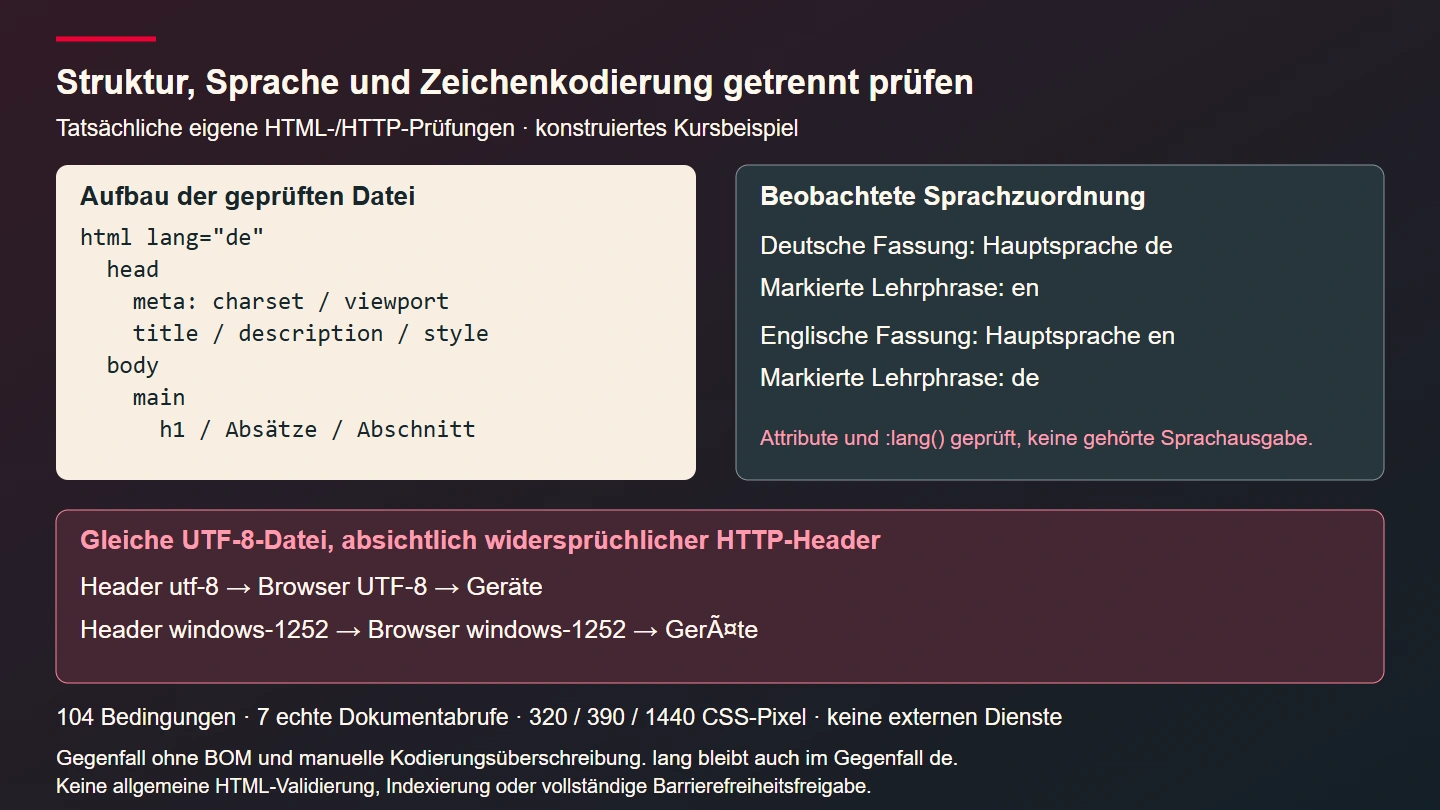
This guide develops a complete small course page in German and English. The course is a constructed teaching example rather than a bookable service. Both documents were checked in a browser and through an isolated HTTP fixture. A total of 104 conditions passed, including seven real document requests and one deliberately contradictory HTTP character set. The results establish particular document properties, not search indexing, guaranteed search snippets or a completed screenreader listening test.
Define the outer document deliberately
The example starts with an HTML doctype declaration. The browser processes the checked files in standards mode. The root element then declares the predominant language. Its head contains document information and embedded CSS. The body contains one main region with a main heading, explanatory paragraphs and a named section. That division makes it possible to distinguish information describing the document from information intended to be read as its content.
The head is not a second visible introductory area. Ordinary paragraphs should not be placed among metadata merely because a template has space there. When source markup is malformed, a browser may move elements or infer missing parts. A page can therefore look usable even though its source structure differs from the structure the author intended. Inspecting both the transmitted source and the resulting document model avoids treating visual appearance as the only evidence.
The WHATWG description of the document head provides the underlying rules. Our ordinary standalone document requires exactly one title element. Special contexts, including an embedded srcdoc document, have their own conditions. The rule used in this example is not presented as an unrestricted statement about every possible HTML context.
Give the title and the main heading their own jobs
The English document title is Workshop course: process and requirements. Its visible main heading is Understand small repairs. Both describe the same constructed subject but emphasise different aspects. The title supplies context when the document appears in a tab or document list. The heading introduces its actual content. They need not contain exactly the same characters, but their meanings should remain compatible.
A larger site needs informative titles for its relevant pages. Repeating a generic word such as “Home” across many documents makes switching between them harder. A title should also avoid promising a service that the content never explains. Our example therefore describes a process and requirements without inventing a price, an available appointment or a supposedly confirmed registration.
The actual checks compare the number and content of title elements independently from the main heading. A deliberately inserted second title is detected as a deviation. This is a particular acceptance condition for these files rather than a general HTML validator. It also says nothing about which wording a search engine might eventually choose to display. That would require evidence from a different system.
Write a description that matches the document
The meta description summarises the nature of the constructed course example. It is a named piece of metadata inside the head. The visible introductory text instead explains the page directly to its reader. These are maintained separately because they may be consumed in different places. A reader should not have to interpret a technical metadata inventory before discovering what a page is about.
A description is not a store for arbitrary keywords. It neither substitutes for readable content nor provides a hidden extension to the offer. If the course page only explains requirements, its description should not suggest that registration can be completed there. A translated document also needs a description in the appropriate language. Accidentally retaining a German description in an English edition would be a genuine editorial mismatch.
The MDN reference for meta explains its different metadata attributes. Our test specifically finds the agreed description in the document head and compares the text. Renaming its metadata name deliberately causes that check to fail. No promise about actual search-result presentation is attached to this narrowly defined verification.
Declare the predominant language on the document
The German edition has lang="de" on its root element and the English edition uses lang="en". This identifies the predominant human language. It does not choose a country, currency or character encoding. A German document can discuss international subjects while still being correctly described as a German-language document. Language should describe the content that is actually present.
The HTML rules for lang explain language tags and inheritance. Our bounded test expects the two values deliberately chosen for these editions. It is not an implementation of a complete validator for every BCP 47 language tag. A regional variant should be selected when an actual linguistic distinction makes it appropriate, rather than as decoration that merely appears more precise.
The WAI explanation of page language describes the benefit of a programmatically determinable default language, including appropriate processing by assistive technology. This example checks actual attributes and browser language matching. It does not report a particular pronunciation or voice as tested. No completed listening exercise with a screenreader is implied by the presence of an attribute.
Mark genuine changes of language within the content
The German page contains a short English teaching phrase. Only the relevant text span receives the different language value; the surrounding explanation remains German. The English page uses a German teaching phrase with its own marker. The predominant language therefore stays clear while the change is described at the point where it genuinely occurs. The surrounding section is not unnecessarily relabelled.
The browser checks confirm that the main heading matches its inherited language and that the explicitly marked phrase matches its different language. The tests use the :lang() selector for those observations. A deliberately incorrect value on the phrase is detected in a counterexample. This checks programmatic assignment, not a person's ability to recognise language or an artificial language-classification model.
Not every product name or technical abbreviation needs an artificial language switch. The actual linguistic role of the passage matters. A complete foreign-language phrase is different from a single established technical term. An unknown language should not be made to look known by inventing a tag. A multilingual editorial team benefits from a written rule for these decisions so that similar passages are treated consistently.
Keep character encoding separate from language
Encoding answers a different question: how are stored or transmitted bytes decoded into characters? The example source really is saved as UTF-8 and contains an early matching meta declaration. That entire declaring element lies within the first 1024 bytes. The test measures the byte length through the end of the element instead of merely counting JavaScript string positions.
Accented letters and non-Latin text make that distinction important. A single character can require several UTF-8 bytes. A check that counted only characters would therefore inspect a different property from the requirement concerning the serialised file. Our declaration is deliberately placed near the beginning, before a large comment, stylesheet or injected template block could push it further down the response.
A declaration does not retroactively convert a file to UTF-8. If different bytes were stored, those bytes remain different. Delivery can add another encoding statement as well. A useful diagnosis must therefore consider the source file, the HTTP response and the encoding actually selected by the browser together. Looking at a visible attribute in isolation is not enough to establish that the delivery path is coherent.
Observe a contradictory HTTP header in a real request
The correct fixture responses deliver the UTF-8 files with a matching HTTP header. A counterexample then delivers the unchanged German bytes while deliberately declaring windows-1252 in that header. The example has no initial byte order mark. In this case, the browser actually uses the contradictory transport declaration. A word that should contain an umlaut becomes corrupted even though the meta declaration still says UTF-8.
The WHATWG encoding-detection rules describe the available signals and their order. This counterexample demonstrates a particular conflict without a BOM or a manual browser override. It should not be shortened into an inaccurate claim that the HTTP header necessarily wins under every conceivable condition. The fixture establishes the observed conditions and the result for those conditions.
The corrupted document still has German as its language attribute. That is precisely why the separation matters. Changing lang to repair broken accented characters would address the wrong layer. The correction needs to align the actual bytes and their delivery declaration. Afterwards, the same response should be tested again through the real delivery path rather than only being reopened in an editor.
The complete document code
The following file is the language edition actually exercised by the checks. CSS is embedded so the example needs no external font, script or stylesheet. A shared stylesheet may be appropriate in a larger application, but that organisational choice does not alter the responsibilities of document metadata. This example has no search, authentication or booking function and does not manufacture a successful submission message.
example-en.html
<!doctype html>
<html lang="en">
<head>
  <meta charset="utf-8">
  <meta name="viewport" content="width=device-width, initial-scale=1">
  <title>Workshop course: process and requirements</title>
  <meta name="description" content="A fictional workshop course explains its process, requirements and the distinction between a general description and an actual bookable service offer.">
  <style>
    :root { color-scheme: light; font: 100%/1.6 Arial, sans-serif; }
    * { box-sizing: border-box; }
    body { margin: 0; color: #192329; background: #fffaf3; }
    main { width: min(100%, 48rem); margin: auto; padding: 1.5rem; }
    h1 { line-height: 1.2; overflow-wrap: anywhere; }
    section { margin-top: 2rem; border-top: .25rem solid #b80024; }
    a { color: #a60021; text-underline-offset: .2em; }
    a:focus-visible { outline: .2rem solid #192329; outline-offset: .3rem; }
    blockquote { margin: 1.5rem 0; padding: 1rem; background: #eee4d8; }
  </style>
</head>
<body>
  <main id="inhalt">
    <h1>Understand small repairs</h1>
    <p>This constructed course example demonstrates the structure of a complete HTML document.</p>
    <p><a href="#voraussetzungen">Read the requirements</a></p>
    <section aria-labelledby="voraussetzungen">
      <h2 id="voraussetzungen" tabindex="-1">What to know before the appointment</h2>
      <p>Do not bring your own equipment. This example does not describe an actual bookable event.</p>
      <p>German teaching phrase:</p>
      <blockquote><span lang="de">Werkzeug verstehen</span></blockquote>
    </section>
  </main>
</body>
</html>
The other language edition has the same structure with appropriately translated content. Checks compare the files that were actually executed rather than assuming that one successful template represents both editions. A passing German example is not sufficient evidence for an adjacent English file that might still contain outdated metadata. Language, title, description and visible content are checked per document.
Set the viewport without imposing reading restrictions
The example sets the viewport to device width with an initial scale of one. It contains neither a zoom prohibition nor an artificially low maximum scale. Content is styled to fit the tested widths without horizontal page overflow. Long headings may wrap and the main region never needs to become wider than the available space. These layout rules are separate from the metadata hint.
The MDN viewport explanation describes its effect on the layout viewport. It is not a substitute for flexible CSS. A thousand-pixel fixed content width would not become a good narrow-screen layout merely because the meta element was correct. A layout problem should likewise not be hidden by preventing readers from enlarging text or the page.
The executed cases use 320, 390 and 1440 CSS pixels. The narrow contexts emulate mobile presentation and their observed inner width matches the selected width. Emulation is not a physical-device exercise and is not evidence for every possible zoom level. The result concerns these contexts and the unchanged example content. Further devices or magnification behaviours require additional cases with their own observations.
Inspect the source and the resulting document model
A browser builds a document model from source markup. Developer tools commonly show that model rather than the exact original bytes. The early encoding declaration and complete files are therefore inspected as source as well. Browser-side checks instead inspect created elements, the document title, actual selected encoding and visible main structure. Those two kinds of evidence complement each other.
Negative copies deliberately add a second title, remove the predominant language, rename the description, replace the main region or falsify the phrase language. Each deviation must be detected by its associated rule. A page remaining readable after a mutation does not make its agreed document structure correct. Conversely, detecting these selected errors does not establish that every possible markup error would be found.
| Property | Actual evidence | Claim not inferred |
|---|---|---|
| Predominant language | Root value and language selector match | No listened-to speech output |
| Document title | One expected title in the head | No guaranteed search-result wording |
| Encoding | UTF-8 delivery and a deliberate header conflict | No audit of every delivery path |
| Presentation | Three widths without page overflow | No complete accessibility approval |
Exercise a real fragment link with the keyboard
The example contains a descriptive link to the requirements section. Browser checks really move focus to the link using Tab and activate it with Enter. Focus then lands on the target heading. The fragment resolves uniquely and the heading labels its section. This exercises a concrete interaction instead of merely assuming that a matching text string somewhere in the file proves the navigation works.
The heading's negative tabindex does not add an extra ordinary stop to the sequential Tab order. It makes the heading focusable as the fragment destination in this tested example. A complete application would also need to check its other links, navigation and forms. One passing fragment interaction does not establish keyboard usability for every component that might later be added.
Prevent conflicting metadata from accumulating in templates
In a larger project, head information often comes from several places: a base template, a page module, translated records and extensions. Explicit ownership prevents duplicate titles or incompatible descriptions. The template can provide structure and insert accepted page data exactly once. A module's ability to change that data should be intentional. Appending another element is not a clean overriding mechanism.
Dynamic data still requires output encoding appropriate to HTML. A title containing quotation marks must not break out of an attribute. The unchanged static files here do not demonstrate a general secure template renderer. Turning them into database-backed templates requires separate handling of text and attribute contexts and renewed inspection of generated responses containing representative special characters.
Do not confuse the document head with a visible header
The similar names can cause confusion during template work. A visible top region containing a logo or navigation can be a header element inside the body. The document head discussed here is the head element. A visible heading does not belong among metadata and navigation should not be inserted there either. This deliberately small example has no additional visible site header so the document lesson remains distinct from navigation design.
The main region is likewise not simply whichever layout container looks largest. It describes the central course content in this example. Changing its background colour does not change that meaning. A broader template should first name regions according to their actual content and purpose, then decide which regions need distinctive visual treatment. Semantic structure and visual design can develop together without being mistaken for the same thing.
A language attribute does not translate the text
Replacing the German root attribute with an English value leaves all German sentences unchanged. It merely gives the browser an incorrect description of the existing content. The English file was therefore actually translated: its title, description, heading, explanation and link use appropriate English text. The deliberately German teaching phrase remains marked as German. Correct language metadata follows the actual edition rather than creating that edition.
A real multilingual workflow also needs to check equivalent meaning. A translated link should still lead to the section it describes and requirements should not accidentally differ between editions. That editorial assessment is distinct from checking attributes. This example compares predetermined text and unique targets; it is not a general translation-quality assessor for future documents written by different people.
Use a concrete acceptance checklist
- Identify the actual predominant language and genuinely different passages per edition.
- Check one suitable document title and a distinct main heading.
- Compare the description with visible content.
- Inspect UTF-8 bytes, the early declaration and HTTP metadata together.
- Exercise multiple widths and a real keyboard route.
- Use negative copies so a check cannot remain green accidentally.
- Separate observed document properties from untested search or speech services.
For these files, acceptance covers 104 actually executed conditions. Six correct HTTP document requests cover both languages at the three widths. A seventh request demonstrates the intentional encoding conflict. Other checks inspect unchanged documents and deliberately mutated copies in the browser. No external service was contacted to publish the course, index it or speak its content.
Extend a foundation whose properties remain inspectable
The next useful step is not a longer indiscriminate list of meta tags. First make the existing document foundation dependable. A genuine language switch between available editions, further page modules or carefully chosen structured data can then be added. Each extension needs its own expectations and should preserve the properties that have already been checked.
This document contract also helps during a redesign. Visual treatment can change while language, title context and the relationship to content must remain meaningful. Checks that separate those responsibilities localise failures more precisely. Corrupted characters lead to a delivery investigation and a wrong translation leads to editorial correction. Neither problem is concealed by adding an unrelated meta element and assuming that more metadata must mean a better document.